
Social Media & Marketing
Meta ads underperforming? Check this auto-ticked box first
Meta auto-ticks "Reach more people likely to respond" when you target a city or region. Here's what the box does, why the 6.7% claim is less impressive than it looks, and why local businesses should untick it.
Meta Ads Underperforming? Check This Auto-Ticked Box First
Meta auto-ticks "Reach more people likely to respond" when you target a city or region. Here's what the box does, why the 6.7% claim is less impressive than it looks, and why local businesses should untick it.
Created: November 19, 2026 | Reading Time: 9 minutes


If your Meta campaigns look healthy in Ads Manager but the phone isn’t ringing, or the enquiries are coming from people you can’t actually service, there’s one setting worth checking before you touch your creative or your budget.
It’s a small checkbox in the Locations section of your ad set. It’s labelled “Reach more people likely to respond”, and Meta ticks it for you.
The box Meta ticks for you
When you choose a city or region as your target location, Ads Manager adds a checkbox directly under the map. In most accounts we look at, it’s already ticked.
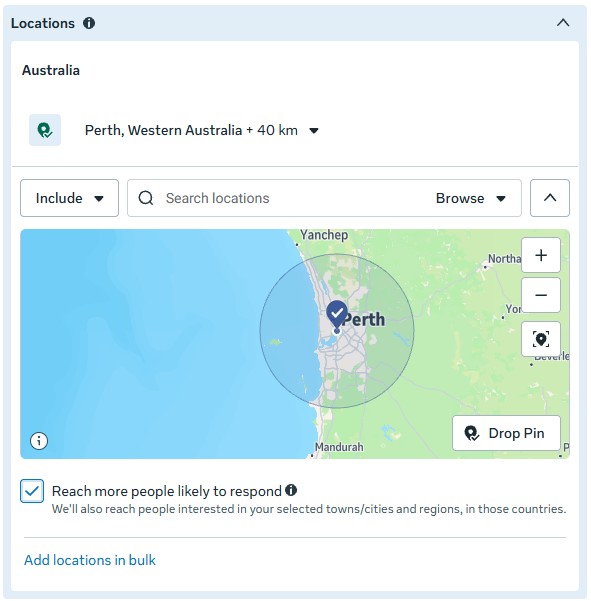
The fine print underneath says: “We’ll also reach people interested in your selected towns/cities and regions, in those countries.”
Read that carefully. You’ve drawn a 40 km circle around Perth, and Meta has added everyone in Australia it believes is interested in Perth.
Meta’s help centre confirms the option is on by default when you select a city or region. So unless you know to look for it and turn it off, it’s how your campaign will run.
What it actually does
Normally, location is a hard control. Meta’s own help centre says it won’t target beyond your selected locations unless this box is selected. Leave it ticked and the boundary becomes a suggestion.
According to Meta, “interested” can mean someone who has:
- recently visited or lived in the city or region
- searched for terms or Marketplace listings related to it
- interacted with ads or Pages related to it
- friends who live there
- a home in a nearby town or city
The only limit is the country. A Perth campaign with this box ticked can be served to someone in Sydney, Cairns or Hobart who has a sister in Scarborough or once looked at a ute on Marketplace in Midland.
About that 6.7% lower cost per result
Hover over the info icon and Meta gives its reason for switching this on.
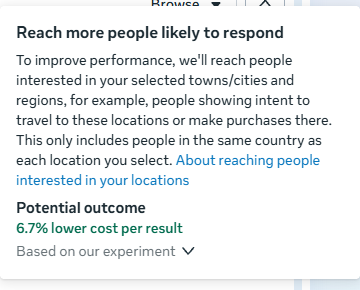
A 6.7% lower cost per result sounds like a good deal. Click “Based on our experiment” and you get the detail. Meta ran the experiment between 11 March 2024 and 18 March 2024, and found a median cost per optimised event that was 6.7% lower than only reaching people living in or recently in a city or region. It finishes with “performance isn’t guaranteed”.
So the number is real, but look at what it’s built on:
- It was one week, more than two and a half years ago.
- It’s a median across Meta’s advertisers. It says nothing about a plumber in Joondalup or a physio in Victoria Park.
- It measures cost per optimised event. That’s whatever your campaign is optimised for: a link click, a landing page view, a post engagement or a lead form. It isn’t a booked job, a paid invoice or a customer who lives close enough for you to turn up.
A bigger pool of people gives the delivery system more chances to find someone who’ll click or fill in a form cheaply. So the maths can improve while the business outcome gets worse. A cheaper lead from someone 3,000 km away isn’t a cheaper lead. It’s a wasted one, plus the time your team spends finding that out.
When a cheap conversion is the wrong conversion
We run Meta campaigns for Sell My Car Pro, a Perth car-buying service, and it’s a good example of why this box matters.
The target area there isn’t a preference. Every vehicle has to be inspected in person, so there’s a hard limit on how far the buyer can travel.
Leave the box ticked and the ad also reaches people Meta considers interested in that area, wherever they live. Some of them see the ad, follow the process and submit their car. In Ads Manager that’s a conversion, and probably a cheap one.
In the real world it’s someone who genuinely wants to sell their car and is about to be told, sorry, we can’t get to you. That isn’t just irrelevant traffic. It’s irrelevant conversions. The seller is let down, the team has spent time on a lead that could never go ahead, and the campaign report says everything is going well.
Nobody wins in that scenario, and the platform’s numbers won’t tell you it’s happening.
Who should untick it
Untick it if you are:
- a local service business, like a trade, mechanic, cleaner, clinic or childcare centre
- any business with a defined service area or delivery zone
- a bricks-and-mortar business that relies on locals rather than tourists
- running lead campaigns where every enquiry costs staff time to follow up
Meta’s own guidance agrees on this point. It lists “if you only want to target audiences who live in a specific location” as a reason to turn the option off. It just doesn’t make that the default.
It may be worth leaving on (or testing) if you are:
- an e-commerce business that ships nationally and can genuinely benefit from the wider reach
- in tourism, accommodation or events, where people planning a trip to your area are exactly who you want
Our rule of thumb: unless you sell Australia-wide, untick it.
How to turn it off
- Open Ads Manager and edit your ad set.
- Scroll to Audience controls, then Locations.
- Untick Reach more people likely to respond.
- Ignore the prompt to apply it again.
- Publish.
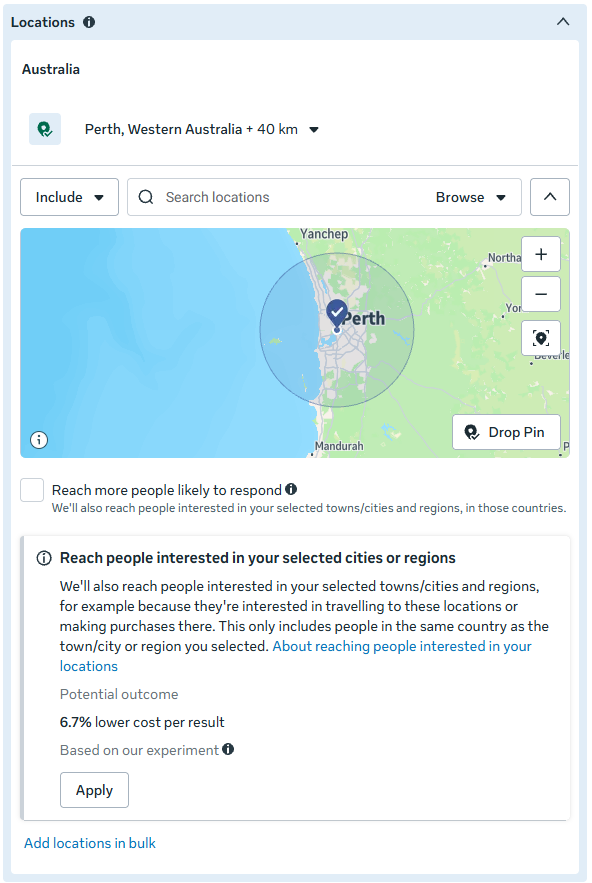
Once it’s unticked, Meta shows a panel underneath with the same 6.7% figure and an Apply button. That panel is an invitation to switch it back on, so leave it alone.
Then make it a habit:
- Check every new ad set before you publish. The box is set per ad set, not per account.
- Check after you duplicate or import. Fellow Australian agency Tactic Lab has reported it switching on for audiences created inside an ad set and for saved audiences imported from Audience Manager.
- Check your live campaigns today. Don’t assume a campaign someone else built, or one you built a while ago, has it switched off.
Never publish a campaign with a defined target area and this box ticked.
How to tell if it’s been costing you
Signs that location expansion has been at work:
- enquiries from people interstate, or well outside your service area
- lead forms that go nowhere when you call them back
- lots of likes, comments and clicks that never turn into bookings
- a jump in website visitors from cities you don’t service
Two quick ways to check:
- In Ads Manager, use Breakdown, then By delivery, then Region, to see which states your ads were delivered to. For a Perth-only business, anything outside WA is a red flag.
- In Google Analytics, look at users by city for traffic from Facebook and Instagram.
We’ve seen the same thing on TikTok
This isn’t just a Meta habit. We’ve seen the same pattern in TikTok campaigns, where automatic placements push ads out beyond the TikTok feed into partner apps and networks.
The traffic numbers look spectacular. Look closer and it’s largely irrelevant: bot traffic, accidental taps, and kids on iPads who were served an ad in the middle of a game. None of them are your customer, and all of them now sit in your website analytics, making it harder to see what your real customers are doing.
The lesson is the same on both platforms. A default setting is built to improve the platform’s numbers, and those aren’t always your numbers.
Trust what you know about your customers
To be fair to Meta, this setting is meant to be helpful. For plenty of advertisers, handing more control to the algorithm does improve results, and where it’s easy to track a sale back to an ad, it’s worth testing.
But most small businesses can’t easily trace every booking back to the ad that started it. When you can’t measure the flow-through, you have to rely on what you know. And you know your customers, your market and how far you’re prepared to drive far better than an algorithm optimising for the cheapest click.
So define your target area, untick the box, and put your budget in front of the people who can actually become customers, not the people who simply find your content interesting.
Checking settings like this one is part of how we manage campaigns through our digital marketing services. If you’d like a second pair of eyes on your Meta or TikTok campaigns, get in touch with the DeCODE team.
Quick answers
What does “Reach more people likely to respond” do in Meta Ads?
It lets Meta show your ads to people outside your selected city or region if it believes they’re interested in that location. They can be anywhere in the same country.
Is it switched on by default?
Yes. Meta’s help centre says the option is on by default when you select a city or region, so it stays on unless you untick it.
Should a local business turn it off?
In most cases, yes. If you can only serve customers in a defined area, people outside it can’t become customers, however cheaply Meta can reach them.
Where does the 6.7% figure come from?
A Meta experiment run between 11 and 18 March 2024, which found a 6.7% lower median cost per optimised event. Meta notes that performance isn’t guaranteed.
Sources
On this page
We’re here to help you DeCODE the Digital World
DeCODE builds breathtaking websites that drive sales for your business without a price that would take your breath away.
We understand that Companies don’t need websites. Companies need a regular stream of high-quality leads. Customers eager, educated, and ready to purchase their products or share their vision. This is the core of a DeCODE build.
In 2026 websites are no longer set and forget, winning an online race is now a marathon, not a sprint. Visually stunning sites with limited back end functionality and no ability to perform in search are redundant.
At DeCODE we build sites that perform.

Adam is a digital marketing specialist, business strategist, and Partner at DeCODE Digital, with 20+ years across marketing, sales, business strategy, and commercial transformation. He works with businesses that need more than a marketing plan: a clear strategy, stronger market position, and a digital presence that drives real commercial growth.