
Social Media & Marketing
Meta's two-link limit and
Facebook Pages now get two link posts or comments a month unless they pay for Meta One. Here's who it hurts, why the first-comment trick is dead, and what we're doing instead.
Meta’s Two-Link Limit and What Australian Businesses Should Do Instead
Meta now limits Facebook Pages to two posts or comments with links a month unless they pay for Meta One. Here's what's changed, who it hurts, why the first-comment trick no longer works, and how we're keeping the enquiries coming in.
Created: October 1, 2026 | Updated: 01/10/2026 | Reading Time: 12 minutes


If your business or organisation posts on Facebook, there’s a good chance you’ll see this message soon, if you haven’t already:
“You used 2 of your posts with links this month. With Meta One, continue sharing links in your posts and comments, plus other subscriber benefits.”
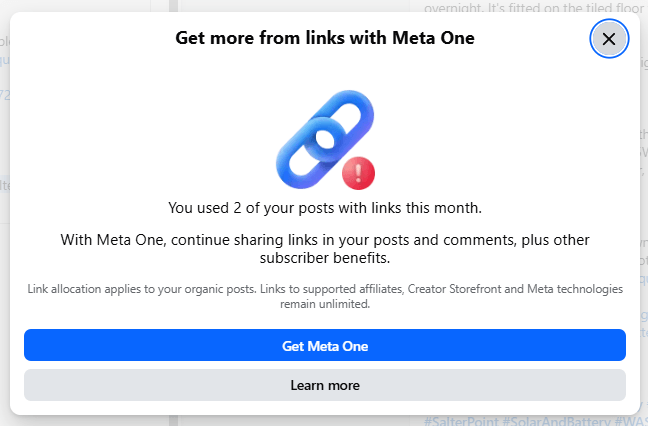
Over the past few weeks we’ve seen it land on client accounts across Western Australia – a solar and battery installer, a home services business and an automotive business. What they have in common is that they post regularly and link back to their websites. Meta has now decided that’s worth charging for.
Here’s what has changed, who it affects, why it’s happening and what we’re doing about it.
What’s changed
Facebook Pages on the free tier can now include external links in two posts or comments per month. Once you’ve used them, Meta blocks the next link and suggests you subscribe to Meta One.
Meta trialled the limit with a small group of Pages from December 2025. It went much wider when Meta One for Business launched globally on 15 September 2026. The rollout is gradual and uneven. Some Pages are restricted and others aren’t yet, and in our experience the accounts that post a lot of links are being hit first.
Who’s affected: Business Pages and personal profiles in Professional Mode. Ordinary personal profiles aren’t affected, and news publisher Pages are currently exempt. Facebook Groups aren’t affected so far.
What doesn’t count towards the limit:
- extra links in the comments of a post that already includes a link
- links to Meta’s own platforms (Facebook, Instagram, WhatsApp and Threads)
- links through Facebook’s affiliate partnerships
- links in ads
The allowance resets on the 1st of each month. Unused links don’t roll over.

Who’s feeling it
This isn’t limited to a handful of our clients. A public discussion on social media strategist Mari Smith’s post about the change drew hundreds of comments from Page owners who had just found out the hard way.
- Braidy’s Board Game & Hobby Club in Warners Bay, NSW, runs a busy calendar of events and community groups. It said links in Facebook posts were almost its entire customer acquisition method, and that it can no longer point people to information about its events.
- Berkhamsted Castle in England, an 11th-century castle cared for by a registered charity, found its links restricted in both posts and comments.
- Thatch Advice Centre, which gives free advice on thatching and thatched properties, regularly shares useful links with its followers and says the change will make that much harder.
Others in the thread are just as exposed:
- Event photographers who post a gallery link after every event. One posts around 12 a month and would need the US$150 plan to keep doing it.
- Real estate agents and car yards who link to individual listings. One agent paid for Meta One and still hit the eight-link cap.
- Allied health practices sharing patient resources, recipes and recalls they don’t earn a cent from.
- Authors, bloggers and independent media whose whole model is sending readers to their work.
It’s not just businesses that lose out
The loudest reaction hasn’t come from businesses trying to make money. It’s come from the organisations that hold communities together.
Think of the people who run local Facebook Pages in Australia:
- the footy club posting fixtures and registration forms
- the school or P&C sharing permission slips, newsletters and game livestreams
- the agricultural show run by volunteers, selling tickets and calling for entries
- the animal rescue linking to each dog or cat available for adoption
- the charity sharing its donation page, and the community group sharing local news and events
None of these are trying to sell anything, and most run on small budgets and volunteer time. A school in the US said it shares at least four livestream links a week for families. An animal rescue said its few dollars would come out of vet bills. A volunteer-run country show was blocked on its very first link of the month, in a comment.
We haven’t seen any exemption for charities or not-for-profits. Berkhamsted Castle is a registered charity, and it’s restricted.
For years Facebook has positioned itself as the place communities gather. For many of these groups, a link was simply how they helped people do something useful, like register, donate, adopt, buy a ticket or read the newsletter. Charging for that changes the deal. And as one commenter put it, a neighbourhood full of nothing but tollbooths and billboards eventually stops being somewhere people want to visit.
What it costs to get your links back
Here’s what Meta One charges for more links. Meta publishes these prices in US dollars and notes that they vary by region. We’ve converted them to an Australian estimate.
| Meta One plan | USD per month | Approx. AUD per month | Approx. AUD per year | Link posts or comments per month |
|---|---|---|---|---|
| Free | $0 | $0 | $0 | 2 |
| Essential | $14.99 | $22 | $259 | 2 |
| Advanced | $49.99 | $72 | $864 | 8 |
| Expert | $149.99 | $216 | $2,592 | 20 |
| Max | $499.99 | $720 | $8,639 | Unlimited |
Put simply, the Advanced plan costs about $9 per link to send people to your own website. Even then, paying doesn’t always solve the problem:
- The Essential plan doesn’t add any links. It costs the same as the old Meta Verified subscription, which used to lift link limits but no longer does.
- Plans are charged per Page, so a business with several locations, or an agency managing several clients, pays several times over.
- Higher tiers still have caps. Eight links a month isn’t much for a busy agent or dealer.
- Some Page owners have tried to subscribe and been told they aren’t eligible.
For most small businesses it isn’t a reasonable trade. For a community organisation it’s usually out of the question.
Why Meta is doing this
Meta earns its money when people stay on Facebook and Instagram and scroll past ads. Every click to an outside website ends that session.
Limiting links isn’t new. Meta’s own reporting shows only 1.3% of widely viewed US Facebook content contained an external link in early 2026, down from 9.8% in 2022. Link posts have been quietly losing reach for years. Now Meta has turned that free behaviour into a paid feature, and the links in ads remain free.
It’s their platform and their rules. Getting angry about it won’t bring the links back. Adapting will.
Why “put the link in the first comment” no longer works
For years the standard workaround for poor link reach was to keep the post clean and drop the link in the first comment. Plenty of articles, scheduling tools and AI assistants still recommend it as the answer to the two-link limit.
It isn’t. Look closely at Meta’s wording. The limit covers links in “posts or comments“. A link in a comment published by your Page uses one of your two monthly slots, just as a link in the post does.
That also rules out:
- “First comment” features in scheduling tools like Buffer or Hootsuite. Those comments are published by your Page and count the same way.
- Scheduling your way around it. Some Page owners assume scheduled posts are exempt because they haven’t been caught yet. Assume every post with a link counts, whichever tool published it.
- Replying to customer questions with links in the comments. Each reply with a URL uses your allowance unless it sits under a post that already has a link.
- Advice written during the trial. Many articles from late 2025 say comments were exempt. That’s no longer the case.
There is one useful exception. Extra links in the comments of a post that already includes a link don’t count again. So when you do use one of your two slots, make that post work hard, and add any related links underneath it.
The style of post this hurts most
For many of our clients, especially trades and home services, the most effective Facebook and Instagram content is proof of work. A real job, recently finished, in a suburb people recognise.
These posts work because they’re specific. They show photos of the finished install, name the suburb and explain what was done and why. The reader sees a business working in their area, on homes like theirs, solving problems they have. It’s local relevance and trust in a few seconds of scrolling.
Historically we’d finish each post with two links: one to the full write-up of the job on the client’s website, and one to request a quote. The post did the convincing, and the website did the converting. It also built a library of project pages that helped the website rank in search.
Under the new rules, a business posting several jobs a month runs out of links within the first week. So we’ve changed the approach.
The comment-and-quote method
We know people will request quotes in the comments. We’ve seen it time and again. So rather than fight the link limit, we make the comment section the call to action.
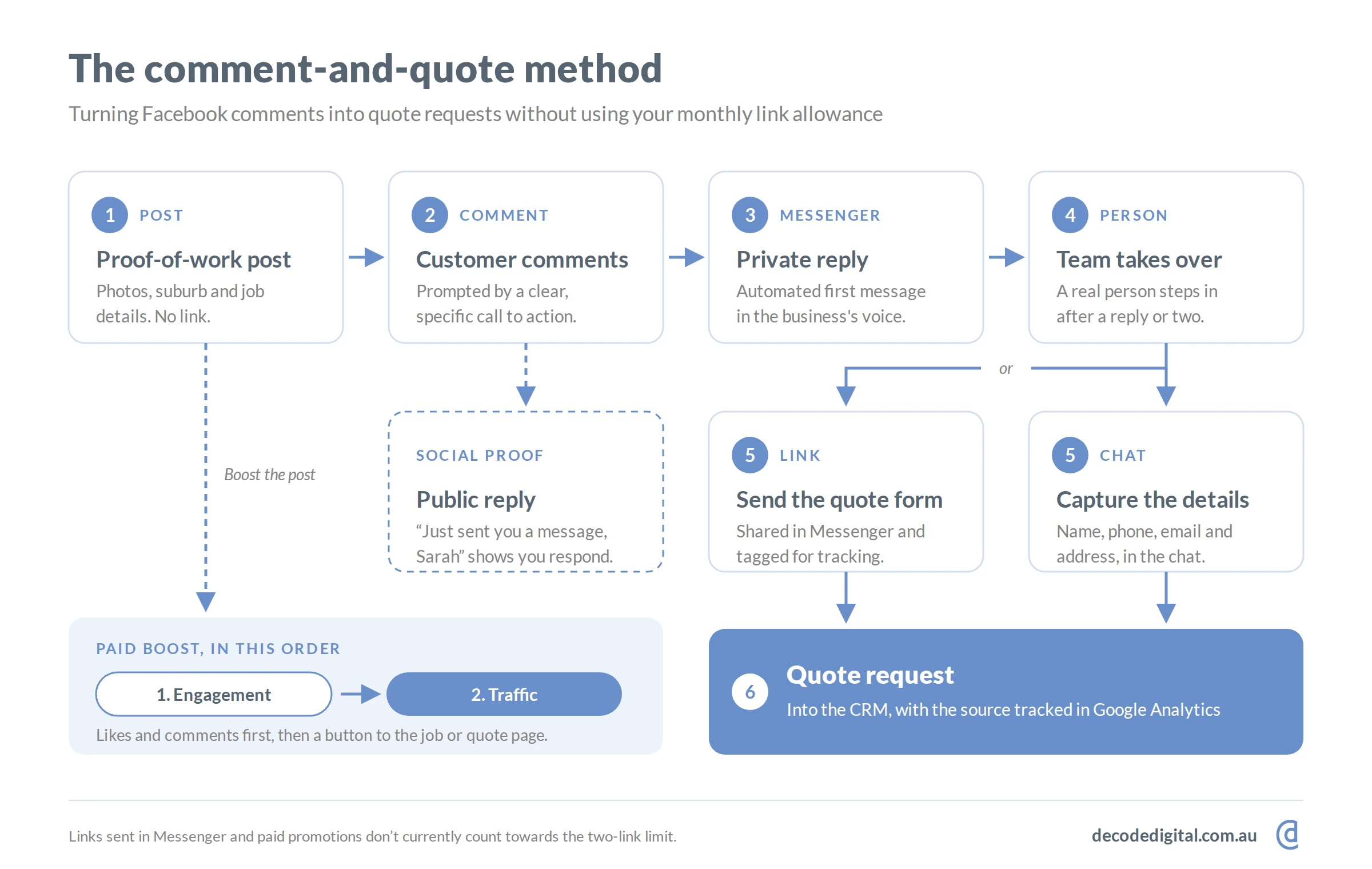
1. Keep the proof of work, lose the URL
Post the same photos, suburb and job details. Nothing in the caption should depend on a link.
2. Ask for a comment, naturally
Replace the link with a clear, specific invitation:
- “Want a quote for a similar setup? Comment QUOTE with your suburb and we’ll message you.”
- “Thinking about a battery for your place? Drop a comment and we’ll send the full details of this install.”
Keep it genuine. Meta has long pushed down posts that beg for engagement (“Comment YES if you agree!”), so tie the request to something the reader actually wants.
3. Move the conversation into Messenger
When someone comments, the business sends them a private message. This can be automated, done by hand, or (ideally) both.
Meta’s rules are simple. A business can send one private reply to each comment within seven days. Once the person replies, the conversation opens up and continues like any other Messenger chat.
Tools that can help:
- Pipereply – our solar and battery client uses Pipereply, a CRM built for Australian solar and trade businesses. It helps automate and manage comment responses and feeds enquiries straight into their sales pipeline.
- ManyChat – a widely used, Meta-approved tool for keyword-triggered comment-to-Messenger flows.
- Meta Business Suite – free and built in. Its “comment to message” automation can send a private reply when someone comments, though at the time of writing it triggers on hashtags (for example #quote) rather than plain keywords, and it doesn’t support follow-up flows.
4. Don’t let the robot run the whole show
This is where many automated setups go wrong. A chain of instant, generic, obviously-AI replies feels cold, and people notice. Someone asking about a $15,000 battery system wants to talk to a person.
A good system should:
- send a friendly first message quickly, in the business’s own voice
- ask one or two useful questions (suburb, what they’re interested in)
- hand over to a real person early, ideally after the first or second exchange
- flag hot leads to the team so nothing sits unanswered over a weekend
Automation should open the door, and a human should be the one who walks the customer through it.
5. Send the link or take the details
Once the conversation is under way, the business can share the quote form and the full job write-up in Messenger. Links sent in direct messages don’t currently count towards the limit. Or the team can collect the name, phone, email and address right there in the chat and skip the form altogether.
6. Reply publicly too
A quick public reply under the comment (“Just sent you a message, Sarah”) shows everyone else that the business responds. That’s social proof, and the comment activity helps the post reach more people.
7. Track it
Add UTM tags to every link you send in Messenger, for example ?utm_source=facebook&utm_medium=messenger&utm_campaign=comment-quote, so the enquiries show up clearly in Google Analytics. Each month, track comments, conversations started and quotes requested.
When comment-and-quote isn’t the right fit
This method works best for considered purchases, where a conversation genuinely helps, like a solar system, a renovation or a vehicle repair. It’s less suited to quick, low-stakes clicks. Plenty of people find “comment RECIPE and we’ll DM you the link” annoying when all they want is the link. If your audience just needs to get somewhere fast, like a ticket page, a donation page or a newsletter sign-up, lean on the pinned post, action button and website link page below instead.
Engagement first, traffic second
Paid promotions don’t count towards the link limit, so ads are the obvious way to put links back on your best posts. But the order matters.
Our standard process is to always promote a post for engagement first. That means likes, comments and shares. Once the post has visible social proof and a comment thread full of quote requests, we run a traffic promotion on the same post. This adds a button linking to the installation write-up or the request-a-quote page.
Why not go straight to traffic? In our experience, posts promoted for traffic from day one attract very few likes or comments. A post with no engagement looks unconvincing, so people don’t click it either. Get the engagement first and the traffic campaign has something to stand on.
Other ways to keep traffic flowing
- Build a pinned hub post. Spend one of your two monthly links on an evergreen post pinned to the top of your Page, such as “See our latest work and request a quote”. Add further links in its comments, which don’t count. Other posts can then point people to that post, and links to Facebook don’t count either. It adds a click, but it works within Meta’s own rules.
- Use your own website, not Linktree, for “link in bio”. A simple links page on your own website keeps the analytics and search value with you. Point your Page’s website field and action button at it.
- Set up your Page’s action button. “Get Quote”, “Book Now” or “Send Message” sits on your Page permanently and doesn’t count.
- Use Stories. Link stickers in Facebook and Instagram Stories currently still work for behind-the-scenes content and recent jobs.
- Use QR codes offline. A QR code isn’t a link, so it doesn’t count. It’s not much use on a phone screen, but it works well on vans, job site signs, flyers and event posters.
- Post your work to Google Business Profile. GBP posts support a link button, appear in local search and Google Maps, and Meta has no say over them. For local trades this is one of the most underused channels available.
- Make your website the home of the full story. Detailed project pages on a well-built website build search visibility over time, whatever Meta decides next. Social media is the trailer, and your website is the feature.
- Build your email list. It’s the one audience you fully own, and it matters most for community organisations whose members need to hear from them.
- Don’t build on loopholes. People are reporting that links still slip through on some devices or apps. Enforcement is patchy during the rollout, and those gaps will close.
The bottom line
Meta’s two-link limit is a real change, and it’s already here in WA. It hurts businesses, but it hurts the community organisations that rely on Facebook to keep people connected even more.
The businesses that come through it best won’t be the ones paying $72 a month to send eight links. They’ll be the ones that:
- turn their comment sections into conversations
- use automation carefully, with people ready to take over
- put their ad budget behind posts that have already earned engagement
- keep building a website and audience that Meta doesn’t control
If you’d like help setting up a comment-and-quote workflow, getting your automation and tracking right, or building a social strategy that doesn’t depend on Meta’s rules, get in touch with the DeCODE team.
Sources
- Meta Help Centre: About links in organic Facebook Page posts and comments
- Mari Smith: Facebook’s new 2-link limit, what’s the real truth?
- Social Media Today: Facebook Pages get charged for link posts
- Mediaweek: Facebook tests limiting link sharing to paid users
- Newcastle Herald: Braidy’s Board Game & Hobby Club, Warners Bay
- XE: USD to AUD mid-market rate
On this page
We’re here to help you DeCODE the Digital World
DeCODE builds breathtaking websites that drive sales for your business without a price that would take your breath away.
We understand that Companies don’t need websites. Companies need a regular stream of high-quality leads. Customers eager, educated, and ready to purchase their products or share their vision. This is the core of a DeCODE build.
In 2026 websites are no longer set and forget, winning an online race is now a marathon, not a sprint. Visually stunning sites with limited back end functionality and no ability to perform in search are redundant.
At DeCODE we build sites that perform.
Adam is a digital marketing specialist, business strategist, and Partner at DeCODE Digital, with 20+ years across marketing, sales, business strategy, and commercial transformation. He works with businesses that need more than a marketing plan: a clear strategy, stronger market position, and a digital presence that drives real commercial growth.