
Google & AI Search
Phone ringing? Better not miss that call
Google's AI calling feature has turned up in Perth search results. Here's what it does, why an unanswered phone now costs more and what Australian businesses should do this week.
Phone Ringing? Better Not Miss That Call
Google's AI calling feature has turned up in Perth search results. Here's what it does, why an unanswered phone now costs more and what Australian businesses should do this week.
Created: November 17, 2026 | Reading Time: 11 minutes


On Monday night we searched Google for outdoor blinds in Perth and saw something that, according to Google, isn’t available in Australia.
Underneath the usual list of local businesses was a new button: “Let’s confirm that it’s in stock”. Tap it, and Google offers to phone nearby shops for you, ask about availability and pricing, and send you the answers within a few minutes.
Google calls this agentic calling. It has been live in the United States for more than a year. We can’t find any announcement of it for Australia, and Google’s own help pages still say it is only available in the US. But there it was, live in a Perth search result.
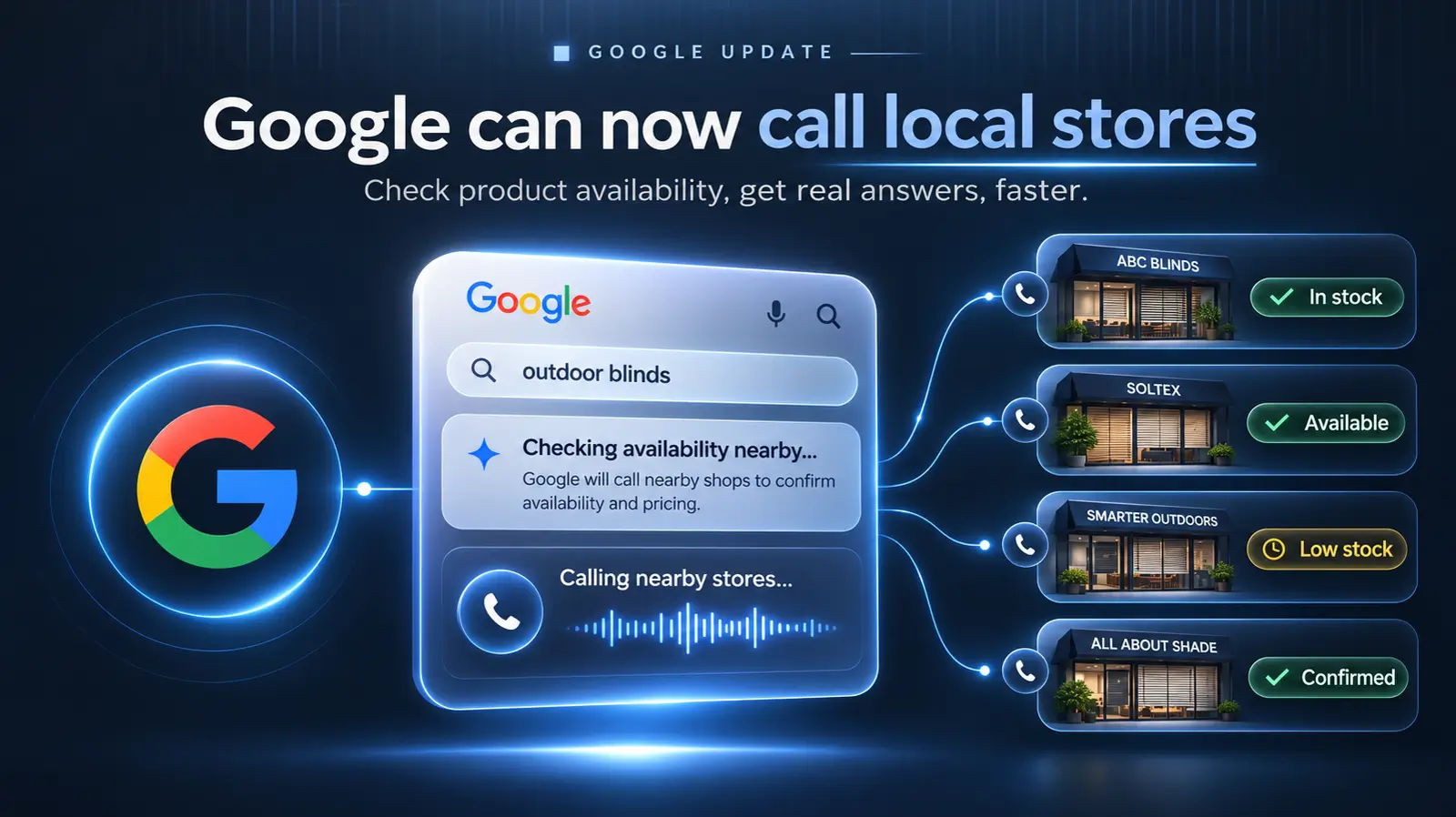
The message for Australian businesses is simple. Some of the calls to your business will no longer come from a customer. They’ll come from Google, ringing on a customer’s behalf, and ringing your competitors at the same time.
If nobody picks up, you’re not in the answer.
What we saw
The search was a plain one: “outdoor blinds”, on a desktop, signed in to a Google account, in Perth.
The local results looked normal, with three businesses, their ratings, distance and opening hours. The new part sat directly underneath.
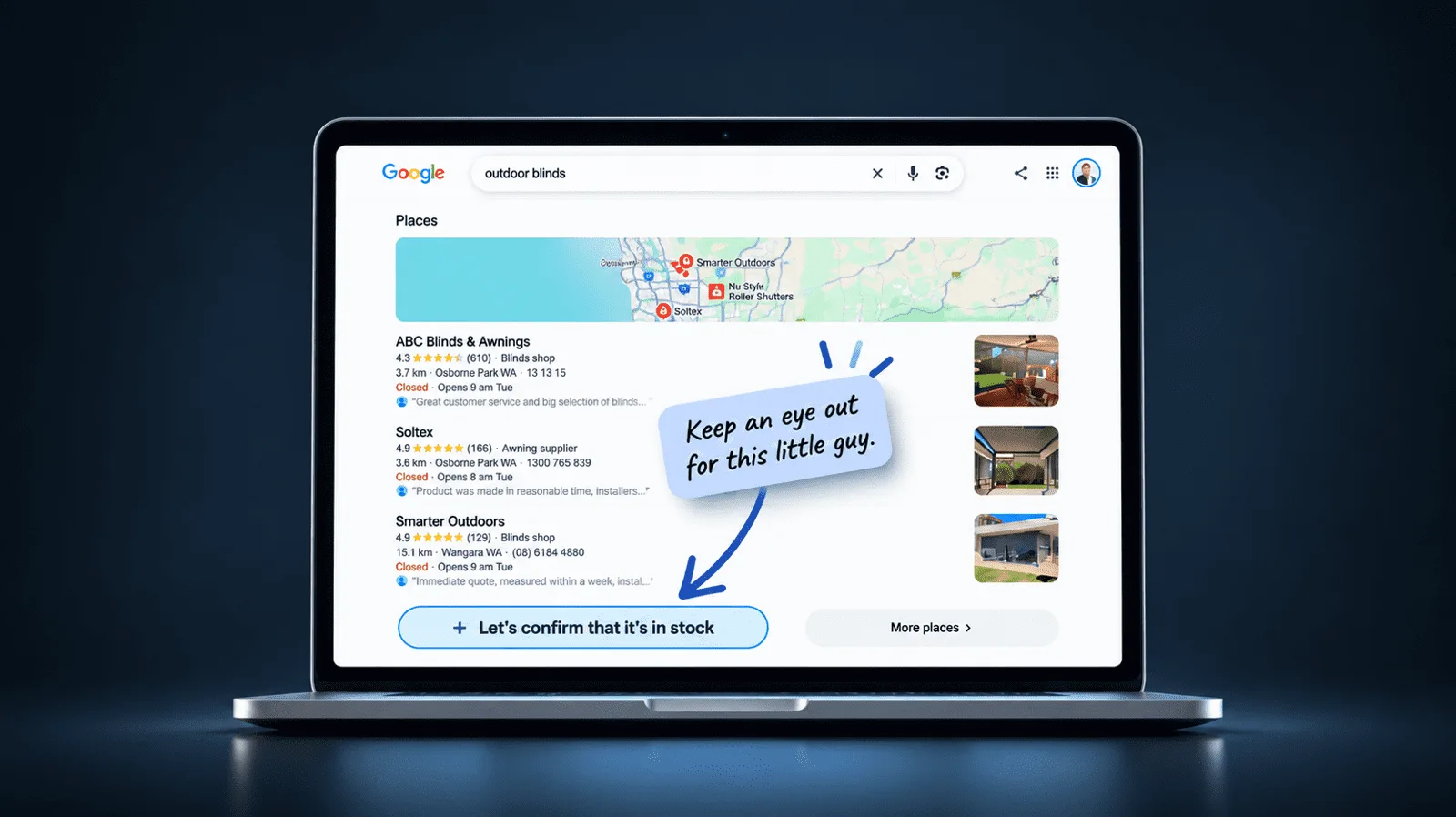
Clicking the button opened a panel titled “Outdoor blinds availability check”. The wording was direct: Google will call nearby shops to confirm availability and pricing for you, and results will be sent within a few minutes.
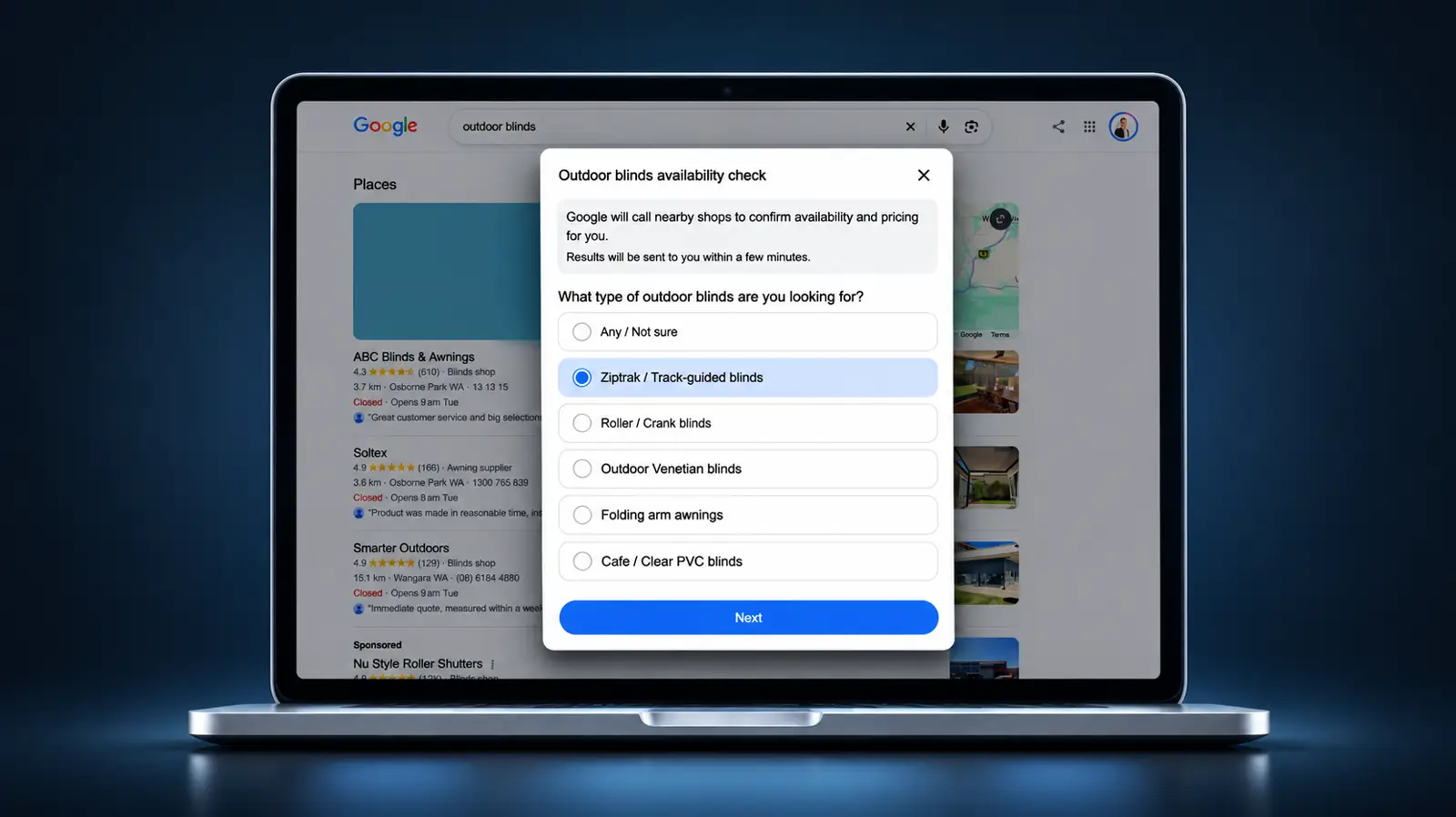
Before it calls anyone, Google asks what you’re after. In our case the options were track-guided blinds, roller or crank blinds, outdoor Venetians, folding arm awnings, cafe blinds or “any / not sure”. These questions are written by Google’s AI for the specific product you searched for.
Two details stood out:
- The wording is localised. The panel says “shops”, not “stores”. This isn’t an American screen that leaked into an Australian result.
- Outdoor blinds aren’t an off-the-shelf product. Most are made to measure, which is why Perth outdoor blinds companies like our client All About Shade measure and quote each job. Google’s US examples are toys, electronics and health and beauty products. Seeing the feature on a custom, quote-based product suggests it’s being applied more widely than the official examples.
It was 11:30 at night and every shop on the list was closed, so we didn’t send the request through. We’ll run it in business hours and add what comes back.
Is this officially in Australia?
Not according to anything Google has published.
- Google’s help page for the feature says it is available only in the US, for English searches by signed-in users, and not in five US states.
- Google’s how-to guide, last updated in July 2026, describes it as a US feature.
- Google’s Business Profile help says automated calls on behalf of customers are available in “select regions and languages”, without listing Australia.
- We couldn’t find any Australian announcement or media coverage.
Even Google’s own AI Overview told us, on the same night, that the feature isn’t offered in Australia.
So Google has either started rolling this out here without announcing it, or it’s testing it on a share of Australian searches before it does. Google has form. In April 2020 it began using its Duplex calling technology to phone Australian businesses and confirm their opening hours, and the news only came out because someone noticed a help page had changed.
We’ll update this article when Google confirms anything.
How we got here
Google has been building towards this for eight years.
| When | What happened |
|---|---|
| May 2018 | Google demonstrates Duplex, an AI that makes phone calls in a natural-sounding voice |
| April 2020 | Duplex starts calling businesses in Australia, the UK and Canada, but only to confirm opening hours for Search and Maps |
| January 2025 | “Ask for Me” launches as a US experiment for nail salons and mechanics |
| July 2025 | AI calling for local services rolls out to all US searchers, with a “Have AI check pricing” button |
| November 2025 | “Let Google call” launches in the US for products: stock, price and current deals |
| May 2026 | At Google I/O, calling is extended to home repair, beauty and pet care as part of AI Mode’s booking features in the US |
| November 2026 | We see the button in Perth search results |
Why a missed call now costs more
Until now, a missed call wasn’t always a lost customer. Some people left a message. Some tried again later. Some sent an email instead.
Agentic calling takes that second chance away. Google rings several businesses, asks each the same questions and sends the searcher a summary a few minutes later. A summary that arrives in minutes has no room for “we’ll call you back”. Google doesn’t say what it does when it reaches a voicemail, a long hold queue or a phone that rings out, but the result isn’t hard to predict. The businesses that answered are in the summary. The ones that didn’t are not.
We’ve seen the same pattern in AI search. At the Chiang Mai SEO Conference last week, Brie Moreau traced a single ChatGPT answer back through its working. Twelve websites were retrieved. Five were cited. The other seven were read and dropped, and their owners will never know they were considered. We covered it in our Day 3 recap.
AI systems are built to get a good answer quickly and cheaply. Anything slow, unclear or hard to verify gets cut, because cutting it is easier than waiting. A phone that isn’t answered is about as slow and unclear as it gets.
There are two rounds, and you need to get through both:
- Getting the call. When the feature launched in the US, Google said businesses are chosen using its normal local search rankings. If you’re not showing up in the local results for your product or service, you’re unlikely to be called at all.
- Answering it. Being shortlisted counts for nothing if the call goes to voicemail.
For a lot of Australian small businesses, round two is the harder one. The owner is on the tools, the front counter is busy, the office closes for lunch or the phone diverts to a mobile that’s on silent. A human customer might forgive that. Software won’t.
What the call is like
Based on Google’s documentation and US reporting:
- It says who it is. The call opens by explaining it’s an automated call from Google on behalf of a customer.
- It’s short. It asks a few specific questions: do you have this, what does it cost, are there any current offers.
- It’s recorded. Google says these calls are monitored and recorded for quality assurance.
- It keeps reasonable hours. Google says it avoids late-night and early-morning calls and limits repeat calls for the same information.
- The customer gets a summary by text or email, listing who has what and at what price.
One warning. Australian businesses already get plenty of scam calls from people claiming to be “from Google”. The real thing never asks for payment, card details or passwords, and never tries to sell you anything. If a caller does, hang up.
What to do this week
- Ring your own number. Call the phone number on your Google Business Profile from a different phone, during business hours. Count the rings. Note where it goes. If it reaches a menu, a long greeting or a voicemail box, that’s what Google’s AI will reach too.
- Check the number is right. Google calls the number on your Business Profile. If that’s an old landline or a mobile nobody watches, fix it today.
- Make sure a person answers in business hours. That could mean a second handset, an overflow to another team member or a live answering service. The setup matters less than the result: a human voice within a few rings.
- Shorten the path to a human. If you run a phone menu, keep it brief and put “speak to someone” first.
- Brief whoever answers. The first reaction to an automated voice is to hang up. Tell your team these calls are coming, that they represent a real customer and that they’re worth 60 seconds.
- Have answers ready. The call asks about price and availability. “You’d have to come in” or “I’ll need to get the boss to ring you back” is a non-answer. Keep a price guide and current lead times by the phone. If your work is quoted job by job, have a typical range and an honest timeframe ready.
- Keep working on local visibility. An accurate Business Profile, the right categories, current opening hours and a steady flow of genuine reviews are what get you on the call list in the first place.
- Retailers, connect your inventory. Google says products shared through Merchant Center don’t need a phone call to confirm stock. If Google already knows what’s on your shelves, you’re in the answer without anyone picking up the phone.
- Think carefully before opting out. You can turn these calls off in your Business Profile under Advanced settings, in the “Bookings and enquiries from customers” option. We’d leave it on. Opting out won’t stop your customers using the feature. It only removes you from their results.
What we don’t know yet
- How many Australian searchers can see the feature, and when Google will confirm it.
- Which products and services are covered here.
- What Google’s AI does when it reaches a voicemail, a phone menu or a hold queue.
- Whether answering, or not answering, has any effect on local rankings. Google hasn’t said so and we’re not suggesting it does.
We’ll keep testing across different searches and industries and report back.
How DeCODE can help
Getting chosen for the call starts with your Google Business Profile, your reviews and your local search visibility. That’s work we do every day for Perth businesses through our digital marketing services.
If you’d like us to check how your business appears in local search and what happens when somebody rings the number on your profile, get in touch with the DeCODE team.
Quick answers
What is Google agentic calling?
It’s a Google Search feature that phones local businesses on a customer’s behalf. Google’s AI asks about availability, pricing and offers, then sends the customer a summary by text or email.
Is agentic calling available in Australia?
Google hasn’t announced it, and its help pages still list the feature as US only. We saw it live in Perth search results on 16 November 2026.
How does Google decide which businesses to call?
Google has said it uses its normal local search rankings and calls businesses that match what the customer asked for. It rings the phone number on your Google Business Profile.
How will I know the call is really from Google?
The call identifies itself as an automated call from Google on behalf of a customer and asks a few short questions. Google never asks for payment, card details or passwords.
Can I stop Google’s AI from calling my business?
Yes. You can ask the caller to stop, or turn off “Bookings and enquiries from customers” in the Advanced settings of your Google Business Profile. Opting out means you won’t be included when customers use the feature.
What happens if I miss the call?
Google doesn’t document this. The customer’s summary arrives within minutes, so a business that doesn’t answer is unlikely to be in it.
Sources
- Google Shopping Help: Ask Google to call nearby shops for you
- Google: How to ask Google to call local businesses for you using agentic calling (updated 24 July 2026)
- Google Business Profile Help: Automated calls from Google on behalf of customers
- Google Business Profile Help: About automated calls and texts from Google to your business
- Google: AI-powered calling to local businesses (16 July 2025)
- TechCrunch: Google rolls out AI-powered business-calling feature (16 July 2025)
- Search Engine Journal: Google Search can now call local businesses using AI
- PPC Land: Google Search at I/O 2026
- VentureBeat: Google quietly expands Duplex to the UK, Australia and Canada (April 2020)
On this page
We’re here to help you DeCODE the Digital World
DeCODE builds breathtaking websites that drive sales for your business without a price that would take your breath away.
We understand that Companies don’t need websites. Companies need a regular stream of high-quality leads. Customers eager, educated, and ready to purchase their products or share their vision. This is the core of a DeCODE build.
In 2026 websites are no longer set and forget, winning an online race is now a marathon, not a sprint. Visually stunning sites with limited back end functionality and no ability to perform in search are redundant.
At DeCODE we build sites that perform.


Adam is a digital marketing specialist, business strategist, and Partner at DeCODE Digital, with 20+ years across marketing, sales, business strategy, and commercial transformation. He works with businesses that need more than a marketing plan: a clear strategy, stronger market position, and a digital presence that drives real commercial growth.