
Launch playbook
Launch Without
How to ship a new website without nuking the SEO equity you've spent years building.
How to Launch a New Website Without Ruining Your Search Rankings
A step-by-step guide to launching or migrating a website without sacrificing the SEO equity, traffic and rankings you have already built.
Created: April 10, 2025 | Reading Time: 7 minutes


Launching a new website or migrating an existing one is a high-stakes moment for any business. Done right, it can boost your rankings and performance. Done wrong, it can decimate your search rankings and organic traffic.
As a web development company and digital agency, DeCODE Digital has seen firsthand the difference a strategic, SEO-conscious launch can make for businesses across all industries.
This comprehensive guide distils the latest best practices and expert advice into a step-by-step roadmap to help you launch or migrate your website without sacrificing your hard-earned SEO equity.

Why SEO Drops Happen During Website Launches
Before diving into the process, it’s important to understand why so many sites lose rankings during a redesign, migration, or relaunch:
Broken or missing redirects
Old URLs that aren’t properly redirected to new ones confuse search engines and users, resulting in lost rankings and traffic. We’ve seen businesses lose up to 70% of their organic visibility simply because they failed to implement a proper redirect strategy.
Lost content or backlinks
Valuable pages or backlinks can disappear if not carefully mapped and preserved. Each lost backlink represents diminished authority in the eyes of search engines.
Technical errors
Issues like broken links, missing metadata, or incorrect robots.txt settings can block search engines from crawling your site. Even small technical oversights can have massive consequences for your visibility.
Structural changes
Altering site architecture or URL structure without a migration plan can disrupt established SEO signals. Search engines need time to understand and trust your new structure.
Content quality or quantity changes
Reducing content volume or quality during migration can trigger ranking drops, as search engines may perceive your site as less comprehensive or authoritative.
Step-by-Step Guide to a Successful SEO-Friendly Website Launch
1. Crawl Your Current Site and Gather All URLs
Use tools like Screaming Frog, JetOctopus, or Sitebulb to extract every URL from your existing site, including those in XML sitemaps and orphan pages.
This comprehensive list is your baseline for planning redirects and preserving SEO value. Don’t forget to capture:
- Regular webpages
- Blog posts and articles
- Category and tag pages
- PDF and other downloadable resources
- Image URLs that receive significant traffic
- Any URL patterns created by faceted navigation or filters
Whilst running your crawl, pay special attention to:
- Pages with parameter strings (question marks in URLs)
- Pages reachable only through site search
- Legacy content that might not be linked from main navigation
2. Benchmark Your Current SEO Performance
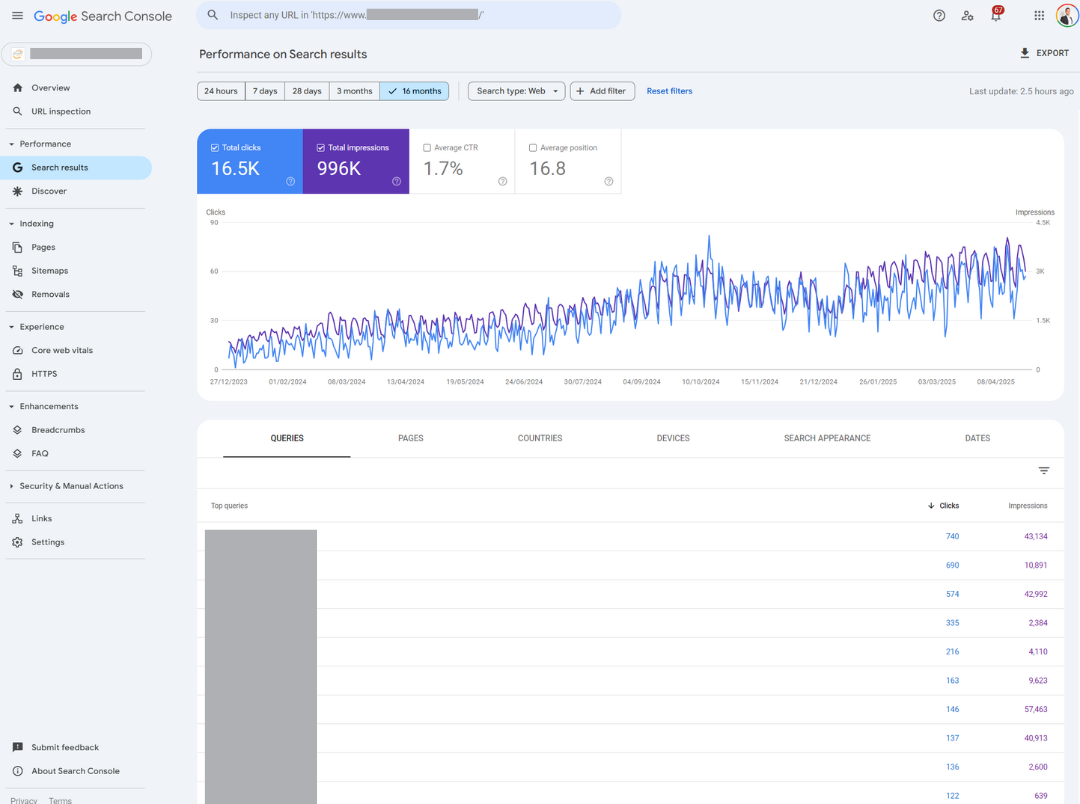
Audit your site’s current rankings, organic traffic, backlinks, and top-performing pages using Google Search Console, Google Analytics, Semrush, or Ahrefs.
Identify which pages drive the most valu,ethese are your highest priorities during migration.
When benchmarking, capture:
- Organic sessions and conversion data (at least 12 months of history)
- Top landing pages by organic traffic
- Keyword rankings for primary and secondary terms
- Pages with the highest number of quality backlinks
- Core Web Vitals and other performance metrics
- Mobile usability issues
This data will serve not only as your migration roadmap but also as the baseline for measuring post-launch success. A thorough benchmark should include seasonal trends so you can distinguish between normal fluctuations and migration-related issues.
3. Consolidate Data into a Master Spreadsheet
Organise your URLs, traffic stats, backlink data, and target actions (keep, redirect, remove) in a single, well-structured spreadsheet.
This document becomes your migration playbook. We recommend including these columns:
- Original URL
- New URL destination
- Redirect type (301, none, etc.)
- Monthly organic traffic
- Number of backlinks
- Key ranking terms
- Page type (product, blog, category, etc.)
- Notes or special handling requirements
- Status (implemented, verified, etc.)
Colour-code high-priority pages that need special attention. Sort by traffic or backlink volume to prioritise the most valuable content.
4. Decide the Fate of Each URL
For every URL, determine whether to:
- Keep (no change, 200 status)
- Redirect (301 redirect to a new or consolidated URL)
- Remove (404 or 410 status if content is obsolete and has no SEO value)
Redirect even low-traffic pages if they have strong backlinks. Consider these factors when making decisions:
- Traffic value: Does the page consistently bring qualified visitors?
- Backlink profile: Does the page have quality inbound links?
- Content relevance: Is the content still relevant to your business?
- Conversion performance: Does the page effectively convert visitors?
- Keyword rankings: Does the page rank well for valuable terms?
For content consolidation, always redirect to the most comprehensive version of similar content. When multiple similar pages exist, consider creating an enhanced version that combines the best elements of each.

5. Create a Detailed Redirect Map
Map every old URL to its new destination, ensuring there are no redirect chains or loops.
Use permanent 301 redirects to signal to search engines that the move is intentional and to transfer SEO equity. Consider these redirect best practices:
- Redirect at the most specific level possible (page-to-page is better than page-to-homepage)
- Maintain content relevance between old and new pages
- Avoid redirect chains (A→B→C); instead, redirect directly (A→C)
- Test redirects for proper implementation before launch
- Document all redirects for future reference and troubleshooting
For large sites, batch your redirects by directory or content type to make implementation more manageable.
6. Build and Test Your Staging Site
Develop your new site in a staging environment that’s protected from search engine indexing (using robots.txt and password protection).
Crawl the staging site to catch issues like broken links, missing metadata, or incorrect canonical tags before launch.
Ensure the staging site mirrors the final version as closely as possible. During staging development, focus on:
- Implementing proper metadata (titles, descriptions, header tags)
- Setting up canonical tags correctly
- Verifying internal linking structure
- Checking mobile responsiveness
- Testing site speed and Core Web Vitals
- Ensuring proper schema markup implementation
- Verifying tracking codes and analytics setup
Run multiple test crawls to catch any issues before they impact your live site. Use a pre-launch checklist to verify all technical SEO elements are properly implemented.
7. Set Up Redirects and Prepare for Launch
Implement your redirect map using .htaccess (Apache), Nginx config, WordPress plugins, or server-side scripts as appropriate.
Double-check all redirects function correctly and do not create redirect loops. Prepare for launch by:
- Updating DNS settings if changing domains
- Lowering TTL values 48 hours before launch to speed up propagation
- Ensuring all team members understand their roles during launch
- Setting up monitoring tools to alert you to any issues
- Creating a communication plan for stakeholders and users
- Preparing social media and email announcements if applicable
Test redirects with tools like Screaming Frog or Redirect Path browser extensions before the actual launch.
8. Launch During Off-Peak Hours
Go live when your site’s traffic is lowest to minimise disruption.
Have your team on standby to address any immediate post-launch issues. Consider a phased approach for large or complex sites:
- First migrate lower-traffic sections to test your process
- Address any issues that arise before continuing
- Progress to higher-traffic sections once confident
- Save your most critical pages for last, when you’ve refined your approach
Document each step of the launch process for future reference and continuous improvement.

9. Crawl and Audit Immediately After Launch
Use crawling tools to check the live site, focusing on:
- Redirects (old URLs point to correct new URLs)
- Broken links
- Missing or duplicate metadata
- Schema implementation
- Canonical tags
- Mobile responsiveness
- Page speed and Core Web Vitals
Fix any errors immediately to prevent search engines from indexing broken or missing pages. Prioritise issues based on the pages’ SEO value.
10. Submit Sitemaps and Update Search Console
Keep your old XML sitemap available for a few days or weeks post-launch to help search engines discover and process redirects faster.
Submit your new XML sitemap to Google Search Console and Bing Webmaster Tools. Additionally:
- Verify ownership of the new domain if applicable
- Use the Change of Address tool in GSC for domain migrations
- Submit URL inspection requests for high-priority pages
- Update property sets if using multiple properties
- Link your analytics accounts to the new property
For international sites, ensure proper hreflang implementation and submit appropriate sitemaps for each language version.
11. Monitor Performance and React Quickly
Annotate the migration date in analytics tools.
Closely monitor rankings, traffic, and crawl errors in Google Search Console, GA4, and your SEO platforms. Set up custom dashboards to track:
- Organic traffic trends
- Crawl stats and errors
- Indexation levels
- Ranking movements
- Conversion rates
- Search impressions and clicks
- Core Web Vitals
Address any unexpected drops or issues immediately. Look for patterns in any issues that emerge—often, a single root cause might affect multiple pages.
12. Implement a Backup and Rollback Plan
Always back up your old site before launch, so you can revert if something goes catastrophically wrong. Your backup should include:
- Complete database dumps
- All site files and assets
- Server configurations and settings
- Redirect maps and .htaccess files
- DNS settings
Document the specific steps required to roll back if necessary, and ensure multiple team members understand the process.

Pro Tips and Common Pitfalls
- Don’t skip the spreadsheet
A master URL/action spreadsheet is your single source of truth for a smooth migration. This document should be living and updated throughout the project.
- Test on multiple devices and browsers
User experience varies significantly across devices. Test your new site on various screen sizes, browsers, and operating systems.
- Don’t forget about paginated content
Category pages, blog archives, and other paginated sections need proper handling during migration.
- Communicate with stakeholders
Keep clients and team members informed about timelines and potential risks. Set realistic expectations about normal post-migration fluctuations.
- Don’t remove valuable content
Even thin or low-traffic pages may have SEO value if they have backlinks—redirect them instead of deleting. When in doubt, redirect rather than remove.
- Watch for mixed content warnings
When migrating from HTTP to HTTPS, ensure all assets and resources also load securely.
- Monitor for weeks, not days
SEO effects can take time to manifest; keep auditing your site for at least a month after launch. Some impacts may not be visible until search engines fully process your changes.
- Update internal links
After migration, conduct a thorough internal linking audit to ensure all links point to new URLs rather than redirects.
- Don’t launch during algorithm updates
If possible, avoid launching during known Google algorithm updates or volatile SERP periods.
Case Study: Preserving SEO During Strainer’s Website Migration
The Challenge
When industrial strainer supplier Strainer approached DeCODE Digital, they faced a critical situation. Their legacy website, built with hard-coded HTML years earlier – was showing concerning signs of declining search performance despite their strong industry reputation. With the majority of their new business coming through organic search, maintaining rankings during migration was business-critical.
The outdated site presented multiple challenges:
- Steadily decreasing organic traffic
- Poor mobile experience
- Limited functionality and difficult content updates
- Growing competition from competitors with modern websites
Our Approach
The DeCODE Digital team implemented a comprehensive migration strategy:
- Thorough SEO audit: We documented all existing URLs, keyword rankings, and backlinks, identifying that a small number of technical resource pages drove a substantial portion of their organic traffic.
- Detailed URL mapping: We created a comprehensive redirect plan for hundreds of URLs, ensuring no valuable page would be lost during migration.
- SEO-focused development: Rather than treating SEO as an afterthought, we integrated it throughout the development process, from CMS selection to information architecture.
- Content preservation and enhancement: We identified opportunities to improve high-performing content rather than simply migrating it.
- Pre-launch testing: We rigorously tested all redirects, technical SEO elements, and site functionality before going live.
- Strategic launch timing: We scheduled the launch during off-peak hours with a team standing by to address any issues immediately.
- Proactive post-launch monitoring: We implemented daily checks of rankings, crawl status, and technical performance, making adjustments as needed.
Results
As anticipated, Strainer experienced a brief dip in visibility during the first few weeks post-launch, a normal pattern as search engines processed the changes. However, by the end of the first month, traffic had recovered to pre-migration levels.
In the months that followed, the site saw substantial growth in organic traffic, significantly outperforming the pre-migration baseline despite increasing market competition. Beyond raw traffic numbers, the site achieved:
- Notably higher conversion rates from visitors to enquiries
- Improved engagement metrics (longer sessions, lower bounce rates)
- Better visibility for target keywords, including many new rankings
- Excellent technical performance scores
Key Success Factors
Several elements contributed to this successful migration:
- Preservation of historical SEO value through meticulous redirect mapping
- Enhanced content quality rather than simple migration
- Technical excellence in mobile experience and page speed
- Proactive monitoring and adjustment post-launch
This case demonstrates that with proper planning and execution, a site rebuild can do more than preserve SEO value, it can significantly enhance it, creating a foundation for sustained digital growth even in competitive markets.
Why Trust DeCODE Digital with Your Website Launch?
At DeCODE Digital, we don’t just build beautiful websites, we build sites that perform. Our proven process ensures your new site not only looks great but also preserves and grows your search visibility, driving high-quality leads and long-term business success.
Our team combines:
- Technical SEO expertise to preserve search equity
- Design knowledge to enhance user experience
- Development skills to ensure flawless functionality
- Analytics capabilities to measure and optimise performance
We’ve successfully managed migrations for businesses across retail, professional services, education, and technology sectors, consistently delivering results that protect and enhance our clients’ digital presence.
Summary Checklist
- Crawl and document all existing URLs
- Benchmark current SEO performance
- Plan redirects and actions for every URL
- Create comprehensive redirect map
- Build and test on staging environment
- Implement and verify redirects
- Launch during off-peak hours
- Crawl and audit post-launch
- Submit sitemaps and update Search Console
- Monitor analytics and react quickly
- Backup and have a rollback plan
- Update internal links post-migration
Launching a new website is a marathon, not a sprint. With careful planning and expert execution, you can avoid the common pitfalls and set your site up for long-term SEO success.
Need expert help with your next website launch or migration?
// THE TAKEAWAY
Book a free consultation with DeCODE Digital to discuss your project today. Our team of migration specialists will help you navigate the complexities of website launches whilst protecting your hard-earned search rankings.
On this page
We’re here to help you DeCODE the Digital World
DeCODE builds breathtaking websites that drive sales for your business without a price that would take your breath away.
We understand that Companies don’t need websites. Companies need a regular stream of high-quality leads. Customers eager, educated, and ready to purchase their products or share their vision. This is the core of a DeCODE build.
In 2026 websites are no longer set and forget, winning an online race is now a marathon, not a sprint. Visually stunning sites with limited back end functionality and no ability to perform in search are redundant.
At DeCODE we build sites that perform.






Adam is a digital marketing specialist, business strategist, and Partner at DeCODE Digital, with 20+ years across marketing, sales, business strategy, and commercial transformation. He works with businesses that need more than a marketing plan: a clear strategy, stronger market position, and a digital presence that drives real commercial growth.