
Email & Security
SPF validation error?
Emails to Hotmail and Outlook are bouncing with an SPF validation error. Here's what it means, why it's happening now, and how two Perth businesses fixed it.
SPF Validation Error? Why Hotmail Is Bouncing Your Emails and How to Fix It
Emails to Hotmail or Outlook bouncing with an "SPF validation error"? Here's what the bounce means, why it's happening now, how two Perth businesses fixed it, and the step-by-step fix for SPF, DKIM and DMARC.
Created: November 10, 2026 | Reading Time: 11 minutes


Have you seen one of these lately?
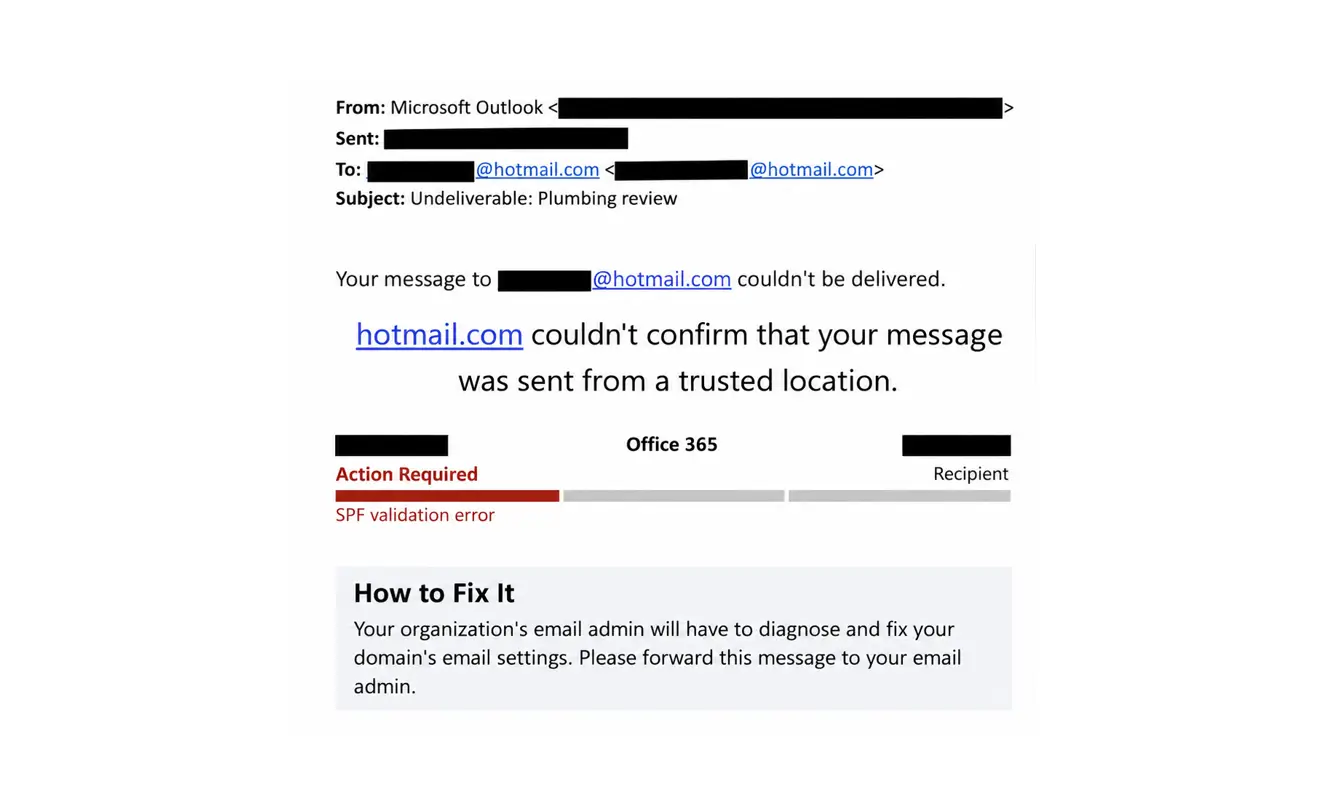
On a Sunday morning in early November, Mike Bury from Coast Runner Plumbing and Gas sat down to do one of the most valuable jobs in a small business. He emailed a couple of recent customers and asked them to leave a Google review.
Both emails bounced. Both customers had Hotmail addresses.
Over the same few days, the team at Eurotech Autohaus, a European vehicle specialist workshop in Perth, started getting the same message back from customers’ inboxes.
Neither business had changed anything. Their email had worked for years. Then, without warning, some of it stopped arriving.
If you’ve received one of these bounce messages, this article explains what it means, why it’s happening now, and how to fix it.
What most people do first
When a bounce like this lands, most people do one of the following:
- Check the email address for a typo. Fair enough, but the address is usually fine. The problem isn’t the recipient, it’s how your domain proves who it is.
- Hit resend. Sometimes this works, which makes the problem easy to ignore. More often the second email bounces too.
- Worry they’ve been hacked. This bounce is not a sign your account has been compromised. It means the receiving mail server couldn’t verify that your email genuinely came from you.
- Wonder who their “email admin” is. For most small businesses, there isn’t one. The email was set up years ago by a previous IT provider, a web developer, a registrar like GoDaddy, or the owner themselves. (If you’re not sure who controls your domain, that’s worth sorting out too.)
- Ignore it. This is the risky one. If one Hotmail customer bounced, others probably did too, and you won’t get a bounce message for every email that quietly lands in junk.
The better first step is to forward the bounce to whoever looks after your domain and email, then read on.
What the bounce actually means
Every time you send an email, the receiving server (in this case Microsoft’s, which runs Hotmail, Outlook.com and Live addresses) asks a simple question: is this email really from who it says it’s from?
To answer it, the server checks a few records published in your domain’s DNS settings. These are like the public listing for your domain. If those records are missing, out of date or don’t match, the server can’t confirm the email is genuine, so it rejects it.
That’s what “couldn’t confirm that your message was sent from a trusted location” means. Microsoft doesn’t think you’re a spammer. It just can’t prove you’re not.
One catch: the error says “SPF validation error”, but SPF isn’t always the problem. Scroll further down Mike’s bounce to the technical details, and there’s a more telling line: “Message lacks SPF/DKIM/DMARC Auth Records”.
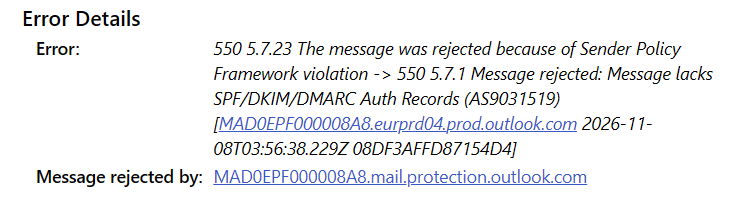
Coast Runner’s SPF record was set up correctly. What was missing were the other two records. So if you check your SPF, find it’s fine and stop there, you may not have fixed anything.
Why this is happening now
The short-term trigger
The wave of bounces started around 5 November 2026. Businesses across Australia and overseas reported emails to Hotmail, Outlook.com and Live addresses being rejected, often intermittently. One email would bounce, and the next would go through.
Microsoft has since acknowledged a service issue affecting delivery to its consumer email addresses, and some businesses with perfectly configured records were caught up in it. At the time of writing, reports differ on whether it’s fully resolved.
But the pattern was clear. The domains bounced most often were the ones missing DKIM and DMARC. Fixing those records stopped the bounces for both of our clients, and for many other businesses reporting the same issue.
The bigger picture
Even if Microsoft’s issue goes away completely, the direction of travel won’t. The big email providers have been tightening the rules for years:
- February 2024: Google and Yahoo began requiring SPF, DKIM and DMARC from bulk senders, and basic authentication from everyone.
- May 2025: Microsoft introduced the same requirements for domains sending large volumes to Outlook.com and Hotmail addresses.
- November 2026: small businesses sending a handful of emails a day started feeling the effects too.
The reason is impersonation. Without these records, anyone can send an email that looks like it came from your business. Scammers use this to send fake invoices with changed bank details, fake quotes and fake “please update your payment” emails to your customers. AI tools now make those emails look convincing, and bots can send them at enormous scale.
The Australian Signals Directorate’s Annual Cyber Threat Report 2025-26, released in October, recorded more than 82,000 cybercrime reports, roughly one every six minutes. Small businesses reported an average cost of $55,400 per report. Phishing was the most common way in, appearing in 39% of the incidents ASD analysed, and the report notes that criminals now use AI to write “effective phishing emails, free from grammar and spelling errors”.
One example in the report will feel close to home for trades. In December 2025, ASD uncovered a business email compromise campaign impersonating Australian construction companies, using more than 400 look-alike domains to send fraudulent emails and push victims into making urgent payments. Scammers will go to a lot of trouble to pass as a business its customers trust. SPF, DKIM and DMARC shut the easiest route of all, which is sending email from your real domain.
So when Microsoft, Google and others refuse email they can’t verify, they’re protecting their users from exactly that. The cost is that legitimate businesses with gaps in their setup get caught in the net.
SPF, DKIM and DMARC in plain English

Think of the receiving mail server as a bouncer at the door of your customer’s inbox.
| Record | What it does | The bouncer analogy |
|---|---|---|
| SPF (Sender Policy Framework) | Lists the mail servers allowed to send email for your domain | The guest list. If the server isn’t on it, the bouncer gets suspicious. |
| DKIM (DomainKeys Identified Mail) | Adds a digital signature to every email, proving it came from you and wasn’t altered on the way | A wax seal on the envelope. If it’s missing or broken, something’s not right. |
| DMARC (Domain-based Message Authentication, Reporting and Conformance) | Tells receivers what to do when an email fails the checks, and sends you reports | Your instructions to the bouncer: “If someone shows up claiming to be us without the right credentials, here’s what to do.” |
All three live in your domain’s DNS. None of them change how you send or read email day to day. They just help the world confirm that your emails are really yours.
Two Perth businesses, two different gaps
Both of our clients had the same bounce message, but the causes were different. That’s why it’s worth checking properly rather than guessing.
Coast Runner Plumbing and Gas: right list, no seal
Coast Runner Plumbing and Gas is a local plumbing and gas business that competes with much bigger national firms. As Mike puts it in his review request emails, online reviews and referrals are one of the best ways a local business can stand out.
So the bounced emails weren’t just a nuisance. They were review requests that would never arrive, from a business that relies on them.
Coast Runner runs Microsoft 365, with its domain managed in GoDaddy. Its SPF record was already correct. But DKIM signing had never been switched on in Microsoft 365, and there was no DMARC record. The email headers confirmed it: the message was sent unsigned, with no DMARC policy to check against.
The fix: we turned on DKIM signing in Microsoft 365, added the two matching DKIM records in GoDaddy, and published a DMARC record. Mike forwarded the bounce on Sunday, and his email was fixed and verified by Tuesday morning, ready to resend those review requests.
Eurotech Autohaus: an out-of-date guest list
Eurotech Autohaus is a busy European vehicle workshop servicing brands like Porsche, Mercedes-Benz, BMW and Audi. Like any workshop, it relies on email for quotes, booking confirmations and conversations with customers.
When we looked at its domain, the SPF record still pointed to an old GoDaddy mail server from before the business moved to Microsoft 365. Microsoft 365 wasn’t on the list at all. In other words, the guest list named a server the business no longer used and left out the one it actually sends through. Every email from the team was at risk, not just the one that bounced.
This is more common than you’d think. Businesses move email providers, and the old DNS records stay behind. Everything keeps working, until a provider starts checking more strictly.
The fix: we replaced the SPF record with one that authorises Microsoft 365, enabled DKIM signing, and added a DMARC record set to monitor only. Emails from the whole team now pass the checks with Outlook, Hotmail, Gmail and other providers. As a bonus, it’s now much harder for scammers to send fake emails pretending to be Eurotech.
How to fix it (Microsoft 365 and GoDaddy)
Most of the Perth small businesses we work with use Microsoft 365 for email, and many manage their domain through GoDaddy, often because they bought Microsoft 365 from GoDaddy in the first place. These steps cover that setup. If you use Google Workspace or another provider, the same three records apply, but the values and screens will differ.
Before you start: you’ll need admin access to Microsoft 365 and login access to wherever your domain’s DNS is managed. If you’re not sure where that is, or you don’t have the logins, stop here and skip to the next section.
Step 1: Check what you have now
Use a free lookup tool like MXToolbox to check your domain’s SPF and DMARC records.
Another quick test: send an email from your business account to a personal Gmail address. In Gmail, open the email, click the three dots and choose Show original. You’ll see SPF, DKIM and DMARC each marked as PASS, FAIL or missing. Anything other than PASS needs attention.
Step 2: Fix your SPF record
In GoDaddy, go to My Products, find your domain and open DNS. Look for a TXT record starting with v=spf1.
For a business that sends only through Microsoft 365, it should read:
v=spf1 include:spf.protection.outlook.com -allTwo important rules:
- You can only have one SPF record. Two SPF records cause SPF to fail completely. If you find more than one, they need to be merged into one.
- Every service that sends email as your domain needs to be included. If your accounting software, booking system, website contact form or newsletter tool sends email from your address, it needs to be in the record too. Leaving one out means those emails can fail.
Step 3: Turn on DKIM in Microsoft 365
- Sign in to the Microsoft Defender portal with a Microsoft 365 admin account. If you’re not sure where it is, a quick search for “Microsoft Defender portal” will find it.
- Find the DKIM settings. At the time of writing they’re under Email & collaboration > Policies & rules > Threat policies > Email authentication settings, on the DKIM tab. Microsoft moves these menus around from time to time, so if it looks different, search Microsoft’s help for “enable DKIM”.
- Select your domain. Microsoft will show you two CNAME records (named
selector1._domainkeyandselector2._domainkey) with values unique to your account. - In GoDaddy DNS, add both as CNAME records, copying the names and values exactly.
- Wait for them to take effect (usually within an hour, occasionally longer), then go back to Defender and switch Sign messages for this domain with DKIM signatures on.
Don’t guess or copy the values from someone else’s setup. They’re specific to your Microsoft 365 account.
Step 4: Add a DMARC record
In GoDaddy DNS, add a new TXT record:
- Name:
_dmarc - Value:
v=DMARC1; p=none; rua=mailto:you@yourdomain.com.au
p=none means “monitor only”. Nothing extra gets blocked, but you’ll start receiving daily reports from Google, Microsoft and others showing who is sending email using your domain. They arrive as technical XML files, so you may want them sent to a separate mailbox, or to a DMARC reporting service that turns them into something readable.
Once the reports show all your legitimate email passing, the policy can be tightened to p=quarantine and eventually p=reject. That’s the point where DMARC actively stops scammers impersonating your domain. It’s also the point where a mistake can stop your own email, so it’s worth getting help with.
Step 5: Test, then resend
Give the changes a few hours, then repeat the Gmail Show original test. All three checks should say PASS.
Then resend any emails that bounced. Rejected emails aren’t retried automatically, so if a quote, invoice or review request bounced last week, the customer still hasn’t got it.
When to call in an IT professional
A quick word on where we fit in. DeCODE Digital is a web design and digital marketing agency. We host and maintain websites, but we don’t manage email for our clients.
We have helped a few clients through this particular issue, including Coast Runner and Eurotech, because it landed on our desk and the fix sat in DNS records we were already familiar with. But email is more complex than it looks, and the simple version above doesn’t cover every business.
It gets complicated when:
- Several services send email as your domain. Xero, MYOB, ServiceM8, website forms, CRMs and newsletter platforms each need to be authorised correctly, and SPF has technical limits on how many can be included.
- You don’t have admin access. Microsoft 365 accounts bought through a reseller like GoDaddy, or set up by a past provider, can be hard to get into.
- You want real protection. Moving DMARC from monitoring to enforcement means reading reports and fixing every legitimate sender first. Get it wrong and your own invoices start bouncing.
- Email is mission-critical. If missed emails mean missed jobs, you want someone who does this every day.
For that, we recommend talking to an IT services company. We often refer clients to Adam Cox at Perth IT Group. Adam and his team have been looking after small and medium businesses in Perth for many years. They know Microsoft 365 inside out, and also charge reasonable prices.
Email should just work
Email is one of those things every business wants to work all day, every day, without ever thinking about how. For years, a business could set it up once and forget about it.
That’s changing. As the big providers fight back against spam, bots and impersonation, they’re asking every business to prove its emails are genuine. Most small businesses don’t know they need to, until a customer’s review request or a quote bounces.
The good news is that once SPF, DKIM and DMARC are in place, they mostly look after themselves. Your emails are more likely to land in the inbox rather than junk, and it’s much harder for anyone to pretend to be you.
Quick answers
Is this my fault or Microsoft’s?
Possibly a bit of both. Microsoft acknowledged a service issue in November 2026 that caught some correctly configured domains. But the domains most often affected were missing DKIM or DMARC, and adding them is good practice whatever Microsoft does next.
Will resending fix it?
Sometimes, because the rejections have been intermittent. But if your records are incomplete, it’ll keep happening. Fix the records, then resend.
I use a personal Hotmail address and someone’s email to me bounced. Can I fix it?
No. The problem is with the sender’s domain, not your inbox. Let them know and forward them the bounce message if you can.
Does this only affect Hotmail?
The current wave is mostly Hotmail, Outlook.com and Live addresses. But Gmail and Yahoo check the same records, and missing them can push your emails into junk even when they don’t bounce.
Does DMARC set to p=none actually protect me?
Not on its own. It gets your email through the checks and gives you visibility. Protection against impersonation starts when the policy moves to quarantine or reject.
How long does the fix take?
The DNS changes take minutes to make and usually a few hours to take effect. Coast Runner’s was sorted within two days of the bounce, including a weekend.
If your website or Google Ads are sending you enquiries but your emails aren’t reaching customers, the marketing is only doing half its job. Get in touch with the DeCODE team if you’d like a hand working out where to start.
Sources
- Australian Signals Directorate: Annual Cyber Threat Report 2025-26 (PDF)
- WindowsForum: Outlook.com and Hotmail reject emails with 550 errors
- Windows Latest: Outlook.com inboxes missing emails since 5 November
- LazyAdmin: Fix “Message lacks SPF/DKIM/DMARC Auth Records (AS9031519)”
- dmarcian: Outlook.com is rejecting some mail from domains with no DMARC record
On this page
We’re here to help you DeCODE the Digital World
DeCODE builds breathtaking websites that drive sales for your business without a price that would take your breath away.
We understand that Companies don’t need websites. Companies need a regular stream of high-quality leads. Customers eager, educated, and ready to purchase their products or share their vision. This is the core of a DeCODE build.
In 2026 websites are no longer set and forget, winning an online race is now a marathon, not a sprint. Visually stunning sites with limited back end functionality and no ability to perform in search are redundant.
At DeCODE we build sites that perform.










Adam is a digital marketing specialist, business strategist, and Partner at DeCODE Digital, with 20+ years across marketing, sales, business strategy, and commercial transformation. He works with businesses that need more than a marketing plan: a clear strategy, stronger market position, and a digital presence that drives real commercial growth.