
Social Media & Marketing
Meta One explained:
Getting emails about Meta One? Here's what Meta's new subscription actually is, what each plan includes, what it costs in Australian dollars, and what the setting switching on in November means for your business.
Meta One Explained: What It Is, What It Costs and Whether Your Business Needs It
Getting emails about Meta One? Here's what Meta's new subscription is, what each plan includes, what it costs in Australian dollars, and what the business portfolio setting switching on in November actually means.
Created: October 25, 2026 | Reading Time:


If you manage a Facebook Page for a business, there’s a fair chance your inbox looked like ours last week. Meta sent one email for every business portfolio we have access to, all with the same subject line: “In 14 days, people in your business portfolio can start managing Meta One.”
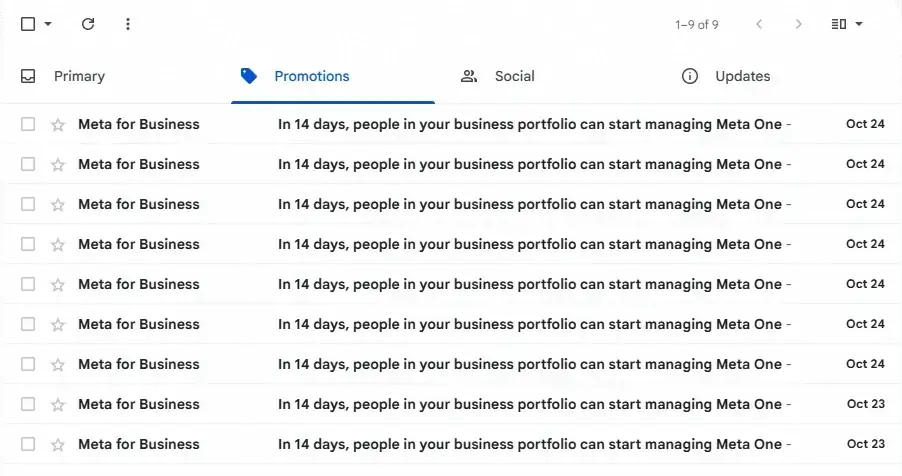
Nine emails in two days, and that was after we’d deleted a few.
Most of the people we’ve spoken to had two questions. What is Meta One, and do I need to do anything? Here’s the short version, and then the detail.
Meta One is Meta’s paid subscription for Facebook, Instagram and WhatsApp. It replaced Meta Verified in September 2026 and bundles the blue tick with a long list of extras, including the ability to post more links.
The emails aren’t asking you to buy it. They’re telling you that from 6 or 7 November, anyone with access to your business portfolio will be able to buy it on the business’s behalf, and that this setting is being switched on for you automatically.
For most small businesses, the right response is to check one setting and otherwise carry on. We’ll show you where it is.
What is Meta One?
Meta One launched globally on 15 September 2026. Meta describes it as “a paid subscription service that provides extra features across different eligible Meta technologies, including Instagram, Facebook, and WhatsApp.” It’s sold per Facebook Page, Instagram profile or WhatsApp Business number, billed monthly, and you can cancel at any time.
It comes in two families:
- Personal plans (Core and Premium), aimed at individuals who want custom app icons, messaging extras and a bigger allowance for Meta’s AI image and video tools.
- Business and creator plans (Essential, Advanced, Expert and Max), which are the ones that matter for a business Page.
If you previously paid for Meta Verified, you’ve been moved onto Meta One. The Essential plan is the closest equivalent.
Meta’s own help page still says Meta One is “in limited testing and isn’t available everywhere yet”, that what you see “may vary based on your location, account type and what’s currently available in testing”, and that onboarding is only available through the mobile apps for now. In other words, it’s live and being pushed hard, but the details are still moving. Treat anything you read about it, including this article, as a snapshot.
Why you’re suddenly hearing about it
Two things happened at once.
First, when Meta One for Business launched, Meta expanded a limit it had been testing since late 2025: Facebook Pages on the free tier can now include external links in only two posts or comments a month. Once you’ve used them, Meta blocks the next link and offers you a Meta One plan. We covered that change, and what to do instead of paying, in Meta’s Two-Link Limit and What Australian Businesses Should Do Instead.
Second, in late October Meta began emailing the admins of every business portfolio about a new permission setting, which is what the “in 14 days” emails are about. That’s the part most people haven’t seen explained anywhere, so we’ll start there.
The November email, explained
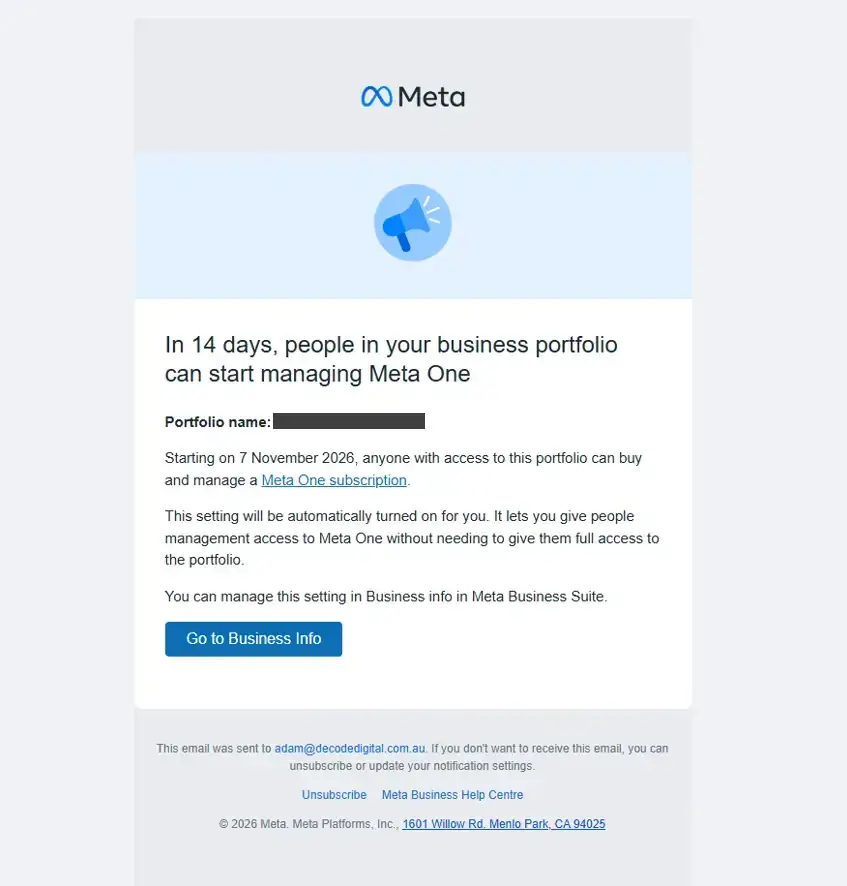
Here’s the full text of the notice, minus the business name:
Starting on 7 November 2026, anyone with access to this portfolio can buy and manage a Meta One subscription.
This setting will be automatically turned on for you. It lets you give people management access to Meta One without needing to give them full access to the portfolio.
You can manage this setting in Business info in Meta Business Suite.
US businesses received the same email on 8 October with a 21 October start date, so Meta is rolling this out region by region.
What it means in plain English:
- A business portfolio is the container in Meta Business Suite that holds your Page, ad account, Instagram account and the people who can work on them. Most businesses have one. Agencies have access to many, which is why we received so many copies.
- Until now, buying a Meta One subscription for a Page was tied to portfolio-level permissions. From November, Meta is adding a specific “manage Meta One” permission that can be granted on its own.
- Meta is turning the setting on by default. That’s the part worth paying attention to. Once it’s on, people who already have access to your portfolio, which may include staff, a former contractor or your marketing agency, can buy a Meta One plan for the business.
Meta frames this as a convenience, and for a large business with a dedicated social media manager it probably is. For a small business it mainly creates a new way to end up with a subscription on the company card that nobody remembers approving.
What to do before 6 November
- Open Meta Business Suite, go to Settings, then Business info. The Meta One management setting will appear there once it’s live. Decide whether you want it on. If you’re the only person who should be making purchasing decisions, turn it off.
- Review People and Partners while you’re there. Remove anyone who no longer works with you. Check which agencies are listed as partners and what level of access they have.
- Decide who manages Meta One, if anyone. If you do subscribe, agree in advance which payment method is charged and which email receives the billing notices.
- If you work with an agency, ask them to tell you before adding any paid plan. We’d expect any reputable agency to do this anyway, but it’s worth saying out loud.
At DeCODE we don’t buy subscriptions on behalf of clients without a conversation first, and that won’t change in November.
What each Meta One plan includes
Meta’s help page lists the business and creator plans in detail. We’ve pulled out the parts that matter for a typical Australian small business and left out the AI image allowances and cloud storage, which are aimed at content creators.
| Essential | Advanced | Expert | Max | |
|---|---|---|---|---|
| Price per month (AUD, per Page or profile) | $17.99 | $61.99 | $179.00 | $599.00 |
| Verified badge and impersonation protection | Yes | Yes | Yes | Yes |
| Link page in Instagram bio (up to 20 links) | Yes | Yes | Yes | Yes |
| Links in Facebook posts per month | None (free allowance of 2) | 8 | 20 | Unlimited |
| Links in Instagram posts per month | None | 4 | 8 | 12 |
| Links in Instagram reels per month | None | 4 | 8 | 12 |
| Links in Facebook reels per month | None | 8 | 20 | Unlimited |
| Featured in Facebook feed, optimised search, follow invitations | No | Yes | Yes | Yes |
| Instagram shared access (people who can post without your password) | No | 4 | 8 | 30 |
| Advanced scheduling (up to a year ahead, grid preview, bulk upload) | No | Yes | Yes | Yes |
| Enhanced profile (locations and linked profiles) | No | 3 | 5 | 8 |
| Competitive insights and insights export | No | Yes | Yes | Yes |
| Human support chats per month | No | 1 | 5 | Unlimited |
| WhatsApp Business broadcast credits | No | 500 | 1,250 | 5,000 |
| WhatsApp verified channels / linked devices | 1 / standard | 3 / 6 | 3 / 6 | 10 / 10 |
A few things stand out.
Essential doesn’t give you any links in posts. It’s the verification tier. If the only reason you’re looking at Meta One is the link limit, Essential won’t help.
The link allowances are modest below the top tier. The Advanced plan gives you eight Facebook post links and four Instagram post links a month. Expert gives you 20 and eight. Only Max, at $599 a month, removes the Facebook cap. If your business posts a finished job every few days and wants to link each one back to your website, the affordable tiers don’t restore what you had for free a year ago.
Several Advanced features are genuinely useful. Scheduling up to a year ahead, shared Instagram access without handing over passwords, competitive insights and a monthly chat with a human at Meta are things businesses have asked for. Whether they’re worth the price depends on how much you rely on Instagram.
Most of the bundle is aimed at creators. Original content credit, custom chat themes, AI video generation allowances and terabytes of cloud storage for the Edits app are there to make the plans look fuller. A plumber doesn’t need 6 TB of cloud storage.
What Meta One costs in Australia
Meta’s public pricing pages quote US dollars and say prices “may vary by region, app and account”. Australian pricing only appears once you start the subscription process from a business account. Here’s what an Australian business Page is currently shown in Meta Business Suite, alongside Meta’s published US prices for comparison.
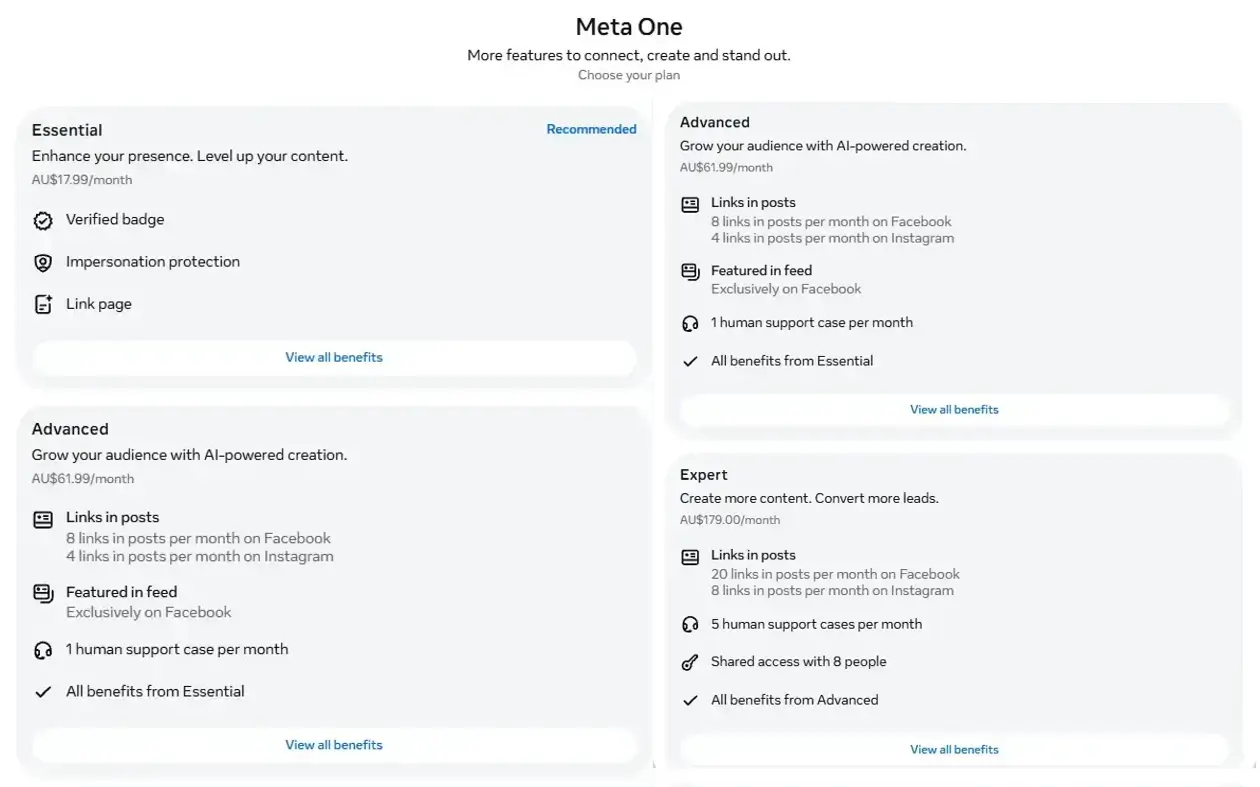
| Plan | AUD per month | AUD per year | US list price per month |
|---|---|---|---|
| Essential | $17.99 | $216 | USD 14.99 |
| Advanced | $61.99 | $744 | USD 49.99 |
| Expert | $179.00 | $2,148 | USD 149.00 |
| Max | $599.00 | $7,188 | USD 499.00 |
To put that in perspective, the Advanced plan works out at about $7.75 per Facebook post link, or just over $5 per link if you use the Instagram allowance as well. Expert is roughly $9 per Facebook link. Links in Meta ads remain free.
Do you actually need it?
Our honest view, for the kinds of businesses we work with.
You probably don’t need Meta One if:
- you mainly use Facebook to show your work, answer questions and take enquiries
- your website, Google Business Profile and ads already do the heavy lifting on traffic
- you can live with two Facebook link posts a month and use them well
- you’d rather spend $60 a month boosting a post that’s already getting engagement
Meta One Advanced might be worth it if:
- Instagram is a primary sales channel and you regularly need to link individual posts or reels to products or offers
- several team members need to post to Instagram and you want to stop sharing one password
- you’re being impersonated, or your category attracts scammers (trades, real estate, finance), and the verified badge plus impersonation monitoring has real value
- you’d use the advanced scheduling and competitive insights every week, not just once
Essential on its own is really a verification product. It’s worth considering if the blue tick matters for trust in your market and you’ve had impersonation problems. Don’t buy it expecting more links.
Expert and Max are priced for brands, publishers and full-time creators. We haven’t yet met a Perth small business for which they make sense.
If what you actually want is more people clicking through to your website from Facebook, the better investment is usually the approach we laid out in the two-link limit article: make the comment section the call to action, move conversations into Messenger, promote posts for engagement first and traffic second, and keep building the website and email list that Meta can’t charge you for.
What to watch
Meta One is a few weeks old and still described by Meta as a test. A few things we expect to change:
- Pricing. The AUD figures above come from one business account’s plan picker. Meta’s public pages still quote USD and warn that pricing varies by region, app and account, so expect some inconsistency until the rollout settles.
- Eligibility. Some Page categories can’t subscribe at all right now, and Meta says the business plans are “not available for certain categories of profiles and Pages” without listing them.
- The link allowances. They’ve already shifted between the Meta Verified era and now. Expect them to keep moving as Meta works out what people will pay for.
- More emails. Each new permission or feature seems to come with a notice to every portfolio admin, so the inbox screenshot at the top of this page probably won’t be our last.
We’ll keep both this article and the two-link limit article updated as things change.
The bottom line
Meta One is a paid tier for Facebook, Instagram and WhatsApp that bundles verification, scheduling, insights and a limited number of link posts. The emails you’re receiving are about who can buy it, not a bill. Check the new setting in Business info before 6 November, tidy up who has access to your portfolio, and decide deliberately whether any plan is worth it for your business rather than letting it be decided for you.
If you’d like a second opinion on whether Meta One makes sense for your Page, or help getting enquiries from Facebook without paying for links, get in touch with the DeCODE team.
Sources
- Meta Help Centre: About Meta One plans
- Meta for Business email: “In 14 days, people in your business portfolio can start managing Meta One”, received 23 and 24 October 2026
- Web Leveling: Who can manage Meta One in your Meta business portfolio
- DeCODE Digital: Meta’s Two-Link Limit and What Australian Businesses Should Do Instead
On this page
We’re here to help you DeCODE the Digital World
DeCODE builds breathtaking websites that drive sales for your business without a price that would take your breath away.
We understand that Companies don’t need websites. Companies need a regular stream of high-quality leads. Customers eager, educated, and ready to purchase their products or share their vision. This is the core of a DeCODE build.
In 2026 websites are no longer set and forget, winning an online race is now a marathon, not a sprint. Visually stunning sites with limited back end functionality and no ability to perform in search are redundant.
At DeCODE we build sites that perform.
Adam is a digital marketing specialist, business strategist, and Partner at DeCODE Digital, with 20+ years across marketing, sales, business strategy, and commercial transformation. He works with businesses that need more than a marketing plan: a clear strategy, stronger market position, and a digital presence that drives real commercial growth.